Best WiFi Routers and Mesh Systems for 2026
The best WiFi router or mesh system for 2026 will depend on the size of your home and the internet package you subscribe to. Smaller homes require either the RS100 or RS300 routers from the Nighthawk brand. On the other hand, larger homes require an Orbi mesh network from the Orbi 370 Series all the way to the 970 Series.
| Product |
Type |
Best For |
WiFi |
Coverage |
Device Capacity |
Multi-Gig Ports |
Why It Stands Out |
| Nighthawk RS100 |
Router |
Smaller homes on a budget |
Dual-band WiFi 7, up to 3.6 Gbps |
Up to 2,000 sq. ft. |
Up to 50 |
2.5 Gig internet |
Affordable way into WiFi 7 |
| Nighthawk RS300 |
Router |
First tri-band upgrade |
Tri-band WiFi 7, up to 9.3 Gbps |
Up to 2,500 sq. ft. |
Up to 100 |
2.5 Gig internet, 2x 2.5 Gig LAN |
Adds 6 GHz and multi-gig LAN |
| Nighthawk RS600 |
Router |
Multi-gig households |
Tri-band WiFi 7, up to 18 Gbps |
Up to 3,300 sq. ft. |
Up to 150 |
10 Gig internet, 10 Gig LAN |
10 Gig wired path to a PC or NAS |
| Nighthawk RS700S |
Router |
Maximum Nighthawk performance |
Tri-band WiFi 7, up to 19 Gbps |
Up to 3,500 sq. ft. |
Up to 200 |
10 Gig internet, 10 Gig LAN |
Highest Nighthawk coverage and capacity |
| Orbi 370 Series |
Mesh |
Affordable whole-home WiFi |
Dual-band WiFi 7, up to 5 Gbps |
Up to 6,000 sq. ft. (3-pack) |
Up to 70 |
2.5 Gig internet and LAN |
Most affordable Orbi WiFi 7 mesh |
| Orbi 770 Series |
Mesh |
Tri-band value for large homes |
Tri-band WiFi 7, up to 11 Gbps |
Up to 8,000 sq. ft. (3-pack) |
Up to 100 |
2.5 Gig on every port |
6 GHz mesh at a mid-range price |
| Orbi 870 Series |
Mesh |
High-performance multi-gig homes |
Tri-band WiFi 7, up to 21 Gbps |
Up to 9,000 sq. ft. (3-pack) |
Up to 150 |
10 Gig internet, 2.5 Gig LAN on every unit |
10 Gig internet with 2.5 Gig wired backhaul |
| Orbi 970 Series |
Mesh |
Premium whole-home coverage |
Quad-band WiFi 7, up to 27 Gbps |
Up to 10,000 sq. ft. (3-pack) |
Up to 200 |
10 Gig internet and 10 Gig LAN on every unit |
Dedicated backhaul band and 10 Gig wired backhaul |
Best WiFi Router for Different Home Needs
A standalone router is the right call when your home is small to medium, you can place the router centrally, and you’d rather spend on one strong unit than on satellites. It’s also the simplest setup if you plug a lot of devices in directly, since all the Ethernet ports sit in one place.
| Model |
Best For |
WiFi Bands |
Coverage |
Devices |
Internet Port |
LAN Ports |
| RS100 |
Apartments and smaller homes |
Dual-band (2.4/5 GHz) |
Up to 2,000 sq. ft. |
Up to 50 |
2.5 Gig |
4x 1 Gig |
| RS300 |
Mid-size homes, first 6 GHz router |
Tri-band (2.4/5/6 GHz) |
Up to 2,500 sq. ft. |
Up to 100 |
2.5 Gig |
2x 2.5 Gig, 2x 1 Gig, USB 3.0 |
| RS600 |
Multi-gig plans, wired power users |
Tri-band (2.4/5/6 GHz) |
Up to 3,300 sq. ft. |
Up to 150 |
10 Gig |
1x 10 Gig, 3x 1 Gig, USB 3.0 |
| RS700S |
Busy homes that want top capacity |
Tri-band (2.4/5/6 GHz) |
Up to 3,500 sq. ft. |
Up to 200 |
10 Gig |
1x 10 Gig, 4x 1 Gig, USB 3.0 |
Nighthawk RS100: WiFi 7 for smaller spaces
The Nighthawk RS100 is the most affordable way into this list. It’s dual-band, so there’s no 6 GHz, but you still get WiFi 7 efficiency, coverage up to 2,000 sq. ft., and a 2.5 Gig internet port that’s ready for plans faster than 1 Gig. It’s a sensible fit for apartments, condos, and smaller homes with a modest number of devices.
Nighthawk RS300: the first step into tri-band
If you want the 6 GHz band, the Nighthawk RS300 is where most people should start looking. It’s tri-band, covers up to 2,500 sq. ft., handles up to 100 devices, and includes two 2.5 Gig LAN ports, which come in handy for a gaming PC or a NAS.
Nighthawk RS600 and RS700S: built for multi-gig
Both of these step up to a 10 Gig internet port and a 10 Gig LAN port. That matters if you’re on a multi-gig fiber plan and want a wired device to see more than 2.5 Gbps. The Nighthawk RS600 covers up to 3,300 sq. ft. and up to 150 devices. The Nighthawk RS700S stretches to 3,500 sq. ft. and up to 200 devices, and adds a fourth Gigabit LAN port.
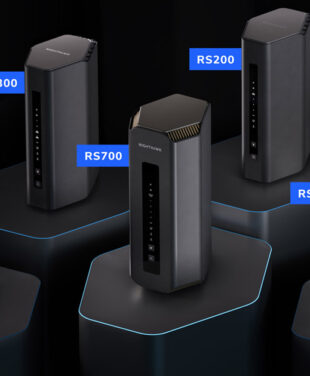
In between these four, the RS150, RS200, and RS500 fill the gaps in price and performance. Our Nighthawk WiFi 7 Router Buyer’s Guide compares every model, and Which NETGEAR router should I buy? walks through the decision step by step. If gaming is the main concern, the Gaming WiFi Gift Guide goes deeper on gaming-focused setups.
Best Mesh WiFi for Different Home Sizes
Choosing the best mesh WiFi system will depend upon your home’s dimensions, structure, internet speed requirements, and number of devices, among other factors. The NETGEAR Orbi WiFi 7 range spans four levels, meaning that you’ll find something suitable for your needs no matter if your house is a ranch or three-story place.
| Series |
WiFi Type |
Best For |
3-Pack Coverage |
Device Capacity |
Wired Connectivity |
Backhaul |
| Orbi 370 |
Dual-band, up to 5 Gbps |
Affordable whole-home WiFi |
Up to 6,000 sq. ft. |
Up to 70 |
Router: 2.5 Gig internet, 1x 2.5 Gig LAN. Satellite: 1x 2.5 Gig |
Enhanced Backhaul; wired option |
| Orbi 770 |
Tri-band, up to 11 Gbps |
Tri-band value |
Up to 8,000 sq. ft. |
Up to 100 |
Router: 2.5 Gig internet, 3x 2.5 Gig LAN. Satellite: 2x 2.5 Gig |
Enhanced Backhaul |
| Orbi 870 |
Tri-band, up to 21 Gbps |
High-performance multi-gig households |
Up to 9,000 sq. ft. |
Up to 150 |
Router: 10 Gig internet, 4x 2.5 Gig LAN. Satellite: 4x 2.5 Gig |
Enhanced Backhaul; 2.5 Gig wired option |
| Orbi 970 |
Quad-band, up to 27 Gbps |
Flagship coverage and capacity |
Up to 10,000 sq. ft. |
Up to 200 |
Router: 10 Gig internet, 10 Gig LAN, 4x 2.5 Gig. Satellite: 10 Gig + 2x 2.5 Gig |
Enhanced Dedicated Backhaul; 10 Gig wired option |
Orbi 370 Series: whole-home reach on a budget
The Orbi 370 Series is NETGEAR’s most affordable WiFi 7 mesh. It’s dual-band, without 6 GHz, but for a family home that mostly needs reach over raw speed, it spreads a signal much farther than a single router can. There’s also a 4-pack that extends coverage to up to 8,000 sq. ft.
Orbi 770 Series: tri-band value
The Orbi 770 Series adds the 6 GHz band and puts 2.5 Gig ports on every unit. It’s the value pick for larger homes where newer phones, laptops, and TVs can take advantage of 6 GHz.
Orbi 870 Series: multi-gig without the flagship price
The Orbi 870 Series includes the ability to have a 10 Gig internet port, which means that your multi-gig fiber internet plan won’t be limited by the router, along with 4 2.5 Gig Ethernet ports for each router and satellite. The ports are usable for hardwiring the device or connecting the units via a 2.5 Gig port.
Orbi 970 Series: the flagship
The Orbi 970 Series is the top of the range. Its quad-band design reserves a band for router-to-satellite traffic, and every unit has a 10 Gig Ethernet port. It makes the most sense for very large homes, heavy simultaneous use, and anyone with 10 Gig wiring in the walls.
Do keep in mind that range estimations presume ideal positioning of satellites. Walls, floors, metals, and interference will diminish the real-life range. The satellite should work best at about the halfway point between the router and the area that needs to be covered, rather than being placed within the dead zone. Check the Orbi Buyer’s Guide for pack quantities and model numbers.
Router vs Mesh WiFi: Which Is Better for Your Home?
A standalone router is often enough for smaller homes where it can sit near the middle. Mesh WiFi is usually better for larger, multi-story, or hard-to-cover homes. Neither is automatically better, so the right choice depends on the coverage problem you’re trying to solve.
| Factor |
Standalone Router |
Mesh WiFi System |
| Home size |
Small to medium, fairly open layout |
Large, multi-story, or long and narrow |
| Dead zones |
Works well when the router is central |
Better for rooms far from the router |
| Expandability |
One unit |
Add satellites later as needs grow |
| Wired devices |
All ports in one location |
Ports at the router and each satellite |
| Satellites and backhaul |
Not needed |
Wireless backhaul, or Ethernet between units |
| Setup |
One box to place |
Router plus satellites to position |
| Typical budget |
Lower for a similar WiFi tier |
Higher, and scales with pack size |
One thing worth saying plainly: a pricier mesh system won’t fix a problem that a good router would have solved. If your home is 1,800 sq. ft. on one level and the router sits in a central hallway, an RS300 may serve you better than a three-piece mesh. On the other hand, if your home office is two floors and a brick wall away from the modem, a satellite will usually reach it more reliably than any single router.
What to Look for in a WiFi Router or Mesh System
To choose a WiFi router or mesh system, match it to your home, internet plan, and devices. Work through this checklist:
- Home size and construction: Count square feet and floors, and think about wall materials. Brick, concrete, and plaster block signal more than drywall.
- Internet plan speed: If you pay for more than 1 Gbps, look for a 2.5 Gig or 10 Gig internet port so the router isn’t the bottleneck.
- Connected devices: Add up phones, laptops, TVs, cameras, and smart-home gear, then leave some headroom.
- WiFi generation and 6 GHz: Tri-band and quad-band models add the 6 GHz band, which newer devices can use for less congested connections. Dual-band models skip it.
- WAN and LAN port speeds: Multi-gig LAN ports matter if you have a NAS, gaming PC, or workstation.
- Wired backhaul: If your home has Ethernet, connecting mesh satellites by cable usually gives more consistent performance.
- Future expansion: Can you add satellites later? Will the system still suit you in a few years?
- Security and management: Look for WPA3, automatic firmware updates, separate guest or IoT networks, and parental controls. NETGEAR Armor is an optional security subscription, with terms that vary by model.
Just a few words about the speed numbers. When they say “up to 9.3 Gbps” or “up to 27 Gbps,” they mean the total maximum speed of all the bands of that particular product. No single phone or laptop can achieve such speed. It will depend on several factors, including the WiFi capabilities of your device, your internet subscription, and many more.
Your older devices will still work, too. Wifi 7 routers are backward compatible, so WiFi 6, 6E, and earlier devices connect normally. They just don’t gain WiFi 7 radio capabilities. Once everything’s set up, the FTC has practical advice on how to secure your home WiFi network.
Is WiFi 7 Worth It in 2026?
WiFi 7 may be the right choice when you own devices that work on 6 GHz technology, have high-speed internet, experience crowded networks, require local file sharing, or have long-term router use ahead. When you have an affordable internet package, live in a small apartment, and your previous WiFi 6 or 6E is keeping up just fine, you don’t need to upgrade yet.
WiFi 7 is the consumer name for IEEE 802.11be, part of the IEEE 802.11 family of standards. The features that make a difference day to day:
- 6 GHz band: More room and less interference from neighboring networks; there are tri-band and quad-band models.
- 320 MHz channels: Wider channels on 6 GHz for higher throughput with compatible devices.
- Multi-Link Operation (MLO): Lets compatible devices use more than one band at once for steadier connections. (Available on Orbi Systems)
- 4K-QAM: Packs more data into each transmission when devices are close to the router.
Remember that headline speeds belong to specific products, not to WiFi 7 itself. The RS100 is rated up to 3.6 Gbps and the Orbi 970 Series up to 27 Gbps, and both are WiFi 7. For detailed model selection, see the Nighthawk WiFi 7 Router Buyer’s Guide and the Orbi Buyer’s Guide.
Modems, Mobile Hotspots and Gift Ideas
A modem and a router do different jobs. The modem connects your home to your internet provider, and the router or mesh system creates your WiFi and manages your devices. Some providers supply a gateway that does both. If you add your own router to one of those, you may need to put the gateway in bridge mode.
Need WiFi when you’re out on the go? That’s what our Travelers Gift Guide has you covered for. Need to shop for someone else? Try our gifts for tech lovers or check out our general gift guide.
Frequently Asked Questions About WiFi Routers and Mesh
What is the best WiFi router in 2026?
The best WiFi router in 2026 depends on your home size, internet speed, number of connected devices, wired-port needs, and whether you need 6 GHz. NETGEAR’s Nighthawk WiFi 7 lineup ranges from value models like the RS100 to high-capacity models like the RS700S.
What is the best mesh WiFi system in 2026?
The best mesh WiFi network is based on several aspects, such as coverage, house plan, internet speed, number of devices connected, and backhaul demands. The NETGEAR Orbi 370, 770, 870, and 970 Series vary in performance, coverage, and price categories.
Is mesh WiFi better than a standalone router?
Mesh WiFi would be the preferred choice for those who have bigger houses, multi-level houses, or difficult houses to cover. On the other hand, a single router would be appropriate for small houses where the router can be placed centrally.
Is WiFi 7 worth it in 2026?
WiFi 7 is worth considering if you have multi-gig internet, newer 6 GHz-capable devices, a busy network, or want a router built for several years of upgrades. A recent WiFi 6 or WiFi 6E system may still be sufficient if it already meets your needs.
How do I choose a WiFi router or mesh system?
Match the system to your coverage area, internet plan, device count, client WiFi capabilities, wired-port requirements, backhaul needs, security features, and budget. Large or difficult layouts generally benefit more from mesh than small open homes.
Do WiFi 6 devices work with WiFi 7 routers?
Yes. Since WiFi 7 routers are backward compatible with previous WiFi versions, WiFi 6 and older devices can also connect, but without WiFi 7 radio functionality.