End of Service Products
NETGEAR stands behind its products with a robust combination of warranties, technical support, and firmware/software updates to keep your NETGEAR equipment performing optimally. This Australia EOS Policy sets forth our commitment to customers to support NETGEAR equipment with software updates.
NETGEAR Products may receive firmware updates over the course of their lifecycle. These updates may contain bug fixes, security fixes, and new features. Eventually, however, all NETGEAR products reach the end of their lifecycle for a variety of reasons including technological advancements, product maturity, and market demands. The end of NETGEAR's product lifecycle is called End of Service or EOS. Products that reach EOS no longer receive firmware updates, including important cyber security updates.
Beginning March 4, 2026, Australia law requires NETGEAR to specify the minimum date that NETGEAR will provide cyber security updates for its consumer products. Complying with law and protecting your rights is important to NETGEAR and therefore a table of NETGEAR products sold in Australia with corresponding current earliest possible EOS dates is provided below.
PLEASE NOTE: NETGEAR endeavors to update its products for as long as reasonably practical for the benefit of customers. However, we can’t foresee precisely when technological advancements or other factors may render further updates unfeasible. Accordingly, the table below provides the current earliest possible date that NETGEAR could cease providing the same level of service updates to your device. Keep an eye on this page as it will be dynamically updated regularly to extend the software update lifecycle of the product until a final EOS date is known. Once the final EOS date is known, we will add the word “FINAL” adjacent to the date indicating it is unlikely to be extended further.
Staying informed about EOS is essential to safeguarding your network and ensuring continued connectivity. Register your NETGEAR products to receive EOS alerts by email .
If your NETGEAR product is not listed below, it’s subject to our Previous End of Service Policy because it was manufactured before March 4, 2026.
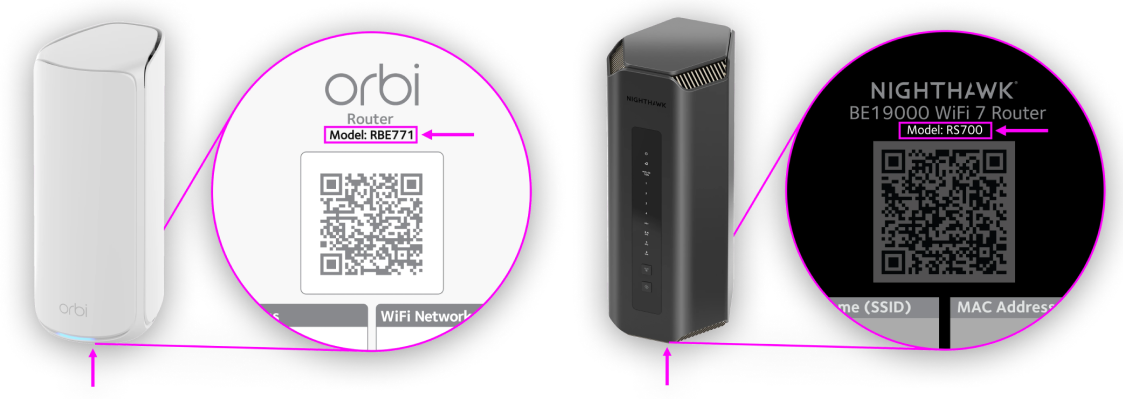
Note: You can check your product’s model and hardware version on the label on the product. If no version is shown, that means the product is version 1 or “v1.”
Safeguarding Your Connectivity
Replace your NETGEAR products with a newer, more advanced NETGEAR product when your product is past its End of Service date. Newer models offer cutting-edge features and built-in protections to help keep your network and connections safe. security To learn more about how NETGEAR products with powerful security features – enabled right out of the box, including exclusive automatic firmware updates and industry-leading safety features - help safeguard your digital world, visit our page on product security.
Commitment to Your Security
By staying informed about the lifecycle of your product support and upgrading, when necessary, you can help maintain a safer, more reliable, and connected experience. Together, we’ll work to support secure, dependable connections that will keep your network ready for the future.
End of Service for Business Products
EOS Frequently Asked Questions
-
What happens if I continue to use my product after the End of Service (EoS) date?
By continuing to use your product after its EoS date, you accept the risk of using a product that is no longer supported by NETGEAR. This means the product will not receive security updates, making it more susceptible to vulnerabilities and potentially putting your home network at a greater risk of cyberattacks.
-
What should I do to ensure my connections and information are protected and secure?
If your product has reached its EoS date, we recommend upgrading to a newer model. Modern products are equipped with the latest security features, firmware updates, and performance enhancements to help safeguard your connections and personal data against emerging threats. Upgrading can also provide faster speeds, a more reliable connection, and added functionality, giving you peace of mind that your network is secure and ready for the future.
-
Why is it important to stay updated with the latest technology?
Staying updated ensures that your network is equipped to handle modern cybersecurity threats while maintaining optimal performance. Older products that no longer receive updates might leave your network vulnerable. By upgrading, you can continue to enjoy safe, reliable, and high-performing connectivity.
-
Where can I find more information about the best NETGEAR upgrade products for me?
Personalized recommendations are available through Concierge, a presales live chat feature on NETGEAR.com product pages. Additional resources to help you select the right WiFi Solution, WiFi Router, or WiFi Mesh System are also available on our website.
-
What should I do with my old EoS product?
We recommend that you reset your EoS NETGEAR product to factory settings, unregister it from your MyNETGEAR account, and then dispose of it through a local e-waste recycler. If you enabled the Remote Access feature through the NETGEAR genie mobile or desktop app, disable Remote Access before factory resetting and recycling your EoS product. Many electronics retailers, thrift stores, and waste management services provide free e-waste recycling services you can use to dispose of your EoS product.
For more information about unregistering and resetting your EoS product, see the following articles or refer to your product’s user manual:
How do I unregister a NETGEAR product from my NETGEAR account? - NETGEAR Support
How do I perform a factory reset on my NETGEAR router? - NETGEAR Support
How do I reset my Orbi WiFi System to factory default settings? - NETGEAR Support