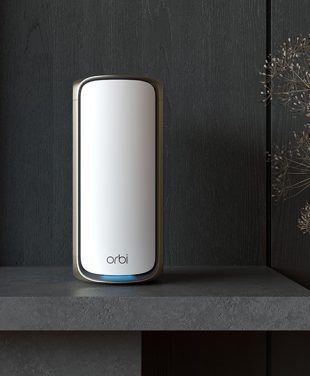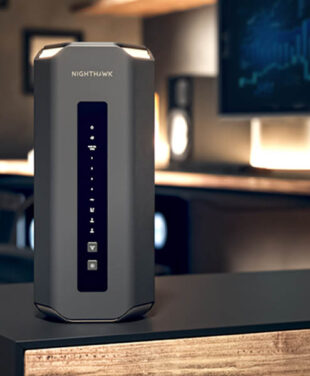
Multi-Gig or 10-Gig routers are sophisticated routers that offer connectivity beyond the conventional 1 Gbps threshold, meaning they can reach speeds up to 10 Gbps.
These routers are designed for power users with high data-transfer demands across the local area network (LAN). With the widespread adoption of ultra-fast multi-gigabit fiber internet plans, regular networking gear can become a bottleneck.
Whether you move large files, stream uncompressed 8K video, need low-latency connectivity for competitive online gaming, or have an overcrowded home network with many devices, multi-gig equipment provides the bandwidth you need.
Explore 10GB Routers & Mesh Systems by NETGEAR
IN THIS ARTICLE
- What Is a Multi-Gig Router and Why Do You Need One?
- Multi-Gig Router Use Cases for Modern Homes
- Understanding Multi-Gig WAN and LAN Ports
- 10 Gig Routers for NAS and High-Speed Storage
- Best NETGEAR Multi-Gig Router Options
- How to Upgrade Your Home Network to Multi-Gig Speeds
- Frequently Asked Questions About 10 Gig Routers
What Is a Multi-Gig Router and Why Do You Need One?
Multi-Gig Ethernet refers to network connections that exceed the standard speed of Gigabit Ethernet (1 Gbps), with ports supporting 2.5 Gbps, 5 Gbps, or even 10 Gbps. Routers that support only 1 Gbps ports can only allow 1,000 Mbps of incoming traffic from the internet, even if your connection is faster.
Choosing between a 2.5Gbps, 5Gbps, or 10Gbps router depends on your internet connection speed and other local network needs. Basic multi-gig connections run at 2.5Gbps, so you can comfortably beat 1Gbps fiber connections, while a 10Gbps router offers the best future-proofing for heavy data transfers within the local network. Advanced home users enjoy much faster file transfers, no network congestion, and higher speeds for device feeding.

Multi-Gig Router Use Cases for Modern Homes
The networks of the information age have generated tremendous data that tends to overwhelm Gigabit networks.
Investing in a multi-gig setup unlocks full capability across several high-demand scenarios:
- Fiber internet plans above 1Gbps: Multi-gigabit fiber internet services need router ports that can handle those speeds and pass them to the internal network.
- 8K streaming: High-bitrate 8K content demands sustained high bandwidth across multiple local streams without buffering.
- Gaming and low-latency applications: Ultra-high speeds and packet routing technology minimize jitter and latency while playing high-intensity games.
- Large file transfers: High-end users transferring multi-gigabyte files such as videos and software experience shorter transfer times.
- Smart home environments: Multiple devices are handled efficiently without affecting the performance of the basic connectivity equipment.
- Remote work with heavy data requirements: Professionals working on cloud backups, remote servers, and large datasets enjoy fast connections.
Understanding Multi-Gig WAN and LAN Ports
Achieving true multi-gigabit speeds across your entire home requires an understanding of both WAN (Wide Area Network) and LAN (Local Area Network) port capabilities.
Multi-Gig WAN Ports
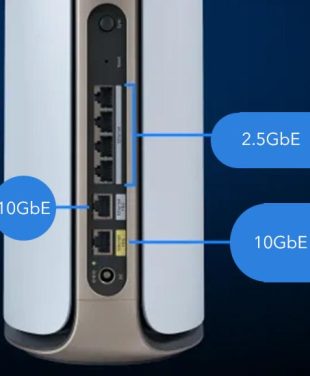
The WAN port is the port on your router that connects directly to the modem, Optical Network Terminal (ONT), or internet gateway. The multi-gig WAN port lets the router receive 2.5Gbps, 5Gbps, or 10Gbps feeds from your Internet Service Provider without limiting the speed to 1Gbps.
Multi-Gig LAN Ports
The LAN ports connect the router directly to your internal devices, such as desktop PCs, multi-gig switches, or NAS units. High-speed LAN ports let your local equipment communicate with the router and each other at multi-gigabit speeds.
Avoiding Speed Bottlenecks
A true multi-gig setup requires speed on both sides of the router. Having a 10Gbps WAN port and 1Gbps LAN ports on your router will mean that none of the wired connections will be faster than 1Gbps.
10 Gig Routers for NAS and High-Speed Storage
For artists, hobbyists, and tech enthusiasts, the NAS becomes an important piece of equipment for backup and multimedia storage in HD format. With a direct connection from the NAS box to a 10 Gig router using a 10 Gbps LAN port, a dramatic increase in storage speeds is achieved.
With 10 Gig NAS connections, you can transfer files as fast as with an internal drive, making it possible to edit 4K and 8K video files without downloading them to the computer. At that speed, you can complete large system backups in a few minutes.
Best NETGEAR Multi-Gig Router Options
How to Upgrade Your Home Network to Multi-Gig Speeds
Upgrading your home network to multi-gigabit speeds involves evaluating every point along the data path to ensure compatibility:
- Internet plan requirements: Confirm that your ISP offers and delivers a multi-gigabit plan (such as 2Gbps, 5Gbps, or 10Gbps).
- Compatible modem or gateway: Make sure your ISP modem or ONT has a matching multi-gigabit output port.
- Ethernet cable considerations: Upgrade your internal cabling to Cat 6, Cat 6a, or Cat 7 cables to reliably support 2.5Gbps to 10Gbps speeds over distance.
- Multi-gig switches: Use dedicated multi-gig unmanaged or managed switches if you need to expand your high-speed wired ports to multiple rooms.
- Device compatibility: Verify that your connected PCs or NAS units feature 2.5Gbps, 5Gbps, or 10Gbps Network Interface Cards (NICs).
When enhancing or upgrading your home WiFi or improving your home network, evaluating these hardware components helps ensure you get maximum ROI from your internet subscription. If you need help choosing a NETGEAR router or want to find the right router for your layout, reviewing specs carefully is essential.
Frequently Asked Questions About 10 Gig Routers
What is a 10 Gig router?
A 10 Gig router is an advanced networking device with 10Gbps Ethernet ports that can handle up to 10,000 Mbps of data throughput for extremely high-speed connections.
Do I need a 10Gbps router for fiber internet?
You only need a 10Gbps router if your fiber internet plan exceeds 1Gbps or if you want to transfer data between local devices, like a NAS, at maximum speed.
What is a multi-gig router?
A multi-gig router is any router featuring Ethernet ports that support speeds higher than standard 1Gbps, such as 2.5Gbps, 5Gbps, or 10Gbps.
What is the difference between multi-gig WAN and LAN ports?
A multi-gig WAN port connects your router to your provider’s high-speed internet, while multi-gig LAN ports connect internal devices like computers and NAS drives at matching speeds.
Can a 10 Gig router improve NAS performance?
Yes, connecting a compatible NAS unit to a 10 Gig router LAN port lets file transfers run at up to 10Gbps, enabling seamless 4K or 8K video editing directly from the storage drive.
What internet speed requires a multi-gig router?
Any internet service plan delivering speeds greater than 1Gbps (such as 1.2Gbps, 2Gbps, 5Gbps, or 10Gbps) requires a multi-gig router to utilize the full bandwidth you pay for.