IN THIS ARTICLE
- What is Mesh WiFi? Video
- WiFi Mesh: An Overview
- What is Mesh?
- What is a Mesh Network?
- What is a Mesh WiFi System?
- How does Mesh WiFi work?
- What is a Mesh Router?
- What are the Benefits of Mesh WiFi?
- Mesh Network: Advantages and Disadvantages
- Mesh WiFi vs Extender: What’s the difference?
- How to set up Mesh WiFi
- FAQ's
What is Mesh WiFi? Video
See a summary of our What is Mesh WiFi? in the short video below:
WiFi Mesh: An Overview
Mesh WiFi systems are wireless networks that combine a WiFi router with one or more mesh satellites to expand the coverage area of a single WiFi network. In a Mesh WiFi system, connected devices are seamlessly handed off to the router or satellite with the strongest WiFi signal in a given area.
This makes mesh WiFi a great solution for large homes and businesses where a single router will not provide adequate coverage. Mesh WiFi systems give users great flexibility to place satellites in different areas for optimal WiFi coverage, preventing WiFi “dead spots” throughout the space.
Shop our best Mesh WiFi Systems
What is Mesh?
Curious about mesh WiFi? Learn how to get the best WiFi coverage and fastest WiFi speeds throughout your whole home by using multiple devices to create a seamless mesh network.
 |
| (add Orbi 370 Series to cart) |
What is a Mesh Network?
A mesh network is a type of local area network (LAN) composed of multiple nodes that work together to broadcast a WiFi signal over a large area. In contrast to WiFi extenders, these nodes (mesh routers and mesh satellites) combine to form a single network with a single login.
Each wireless node communicates with connected devices directly (phones, smart TVs, tablets etc.), but also talks to any other wireless node that is within range and part of the network, allowing seamless handoff between nodes and optimal performance.
What is a Mesh WiFi System?
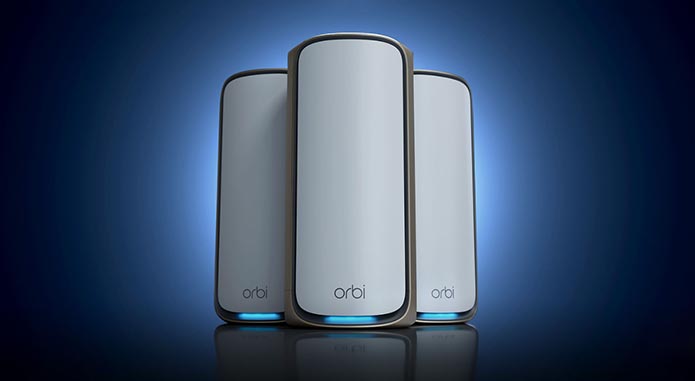
A mesh WiFi system typically includes a mesh router, which connects to the modem (converting a wired internet connection from the modem to WiFi), and mesh satellites, to extend the WiFi signal deeper into the home. In some cases, the cable modem and router are combined in a single unit.
The router and satellites are strategically spaced throughout a home or business to create an overlapping wireless coverage area, allowing strong, continuous WiFi coverage throughout. The best mesh WiFi systems on the market today provide up to 3,000 sq. ft. of coverage or more per satellite
How does Mesh WiFi work?
Mesh networks are a type of network where each node (either the mesh router or mesh satellite) can relay data to other nodes in the network, passing it along until it reaches its destination. This is in contrast to traditional wireless networks, where each device is connected to a single, central router.
For a typical user connected to a mesh network, this forwarding of data between nodes is completely seamless; they have the same experience as being connected to a single super-powerful wireless router, with a strong, reliable WiFi signal in every corner of the home.
Mesh satellites are wired or wirelessly connected to the mesh router via a “backhaul”. The quality and speed of the backhaul connection dictates the maximum speed that satellites can supply to connected devices (phones, laptops, etc.).
Did you know?
NETGEAR’s Orbi Mesh WiFi Systems feature a dedicated WiFi band for the network backhaul. Known as Tri-Band or Quad-Band technology, the unique technology ensures ultra-fast performance from Orbi Mesh Systems, even with hundreds of devices connected.

What is a Mesh Router?
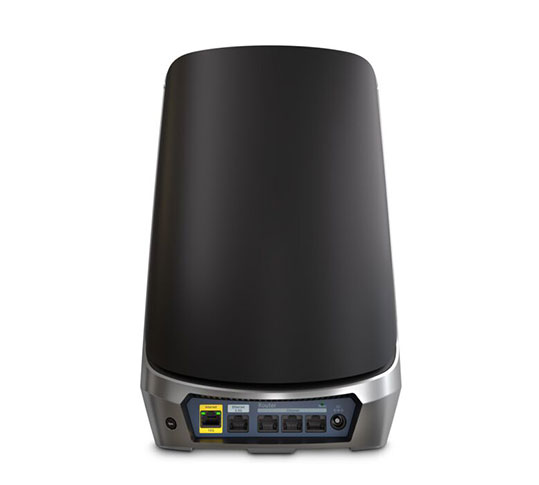
Mesh routers are the heart of a mesh WiFi system. Working in tandem with a modem, the WiFi mesh router directly creates a single, unified network throughout a home by managing and connecting to one or more mesh satellites.
Mesh satellites cannot be used without a connection to the main mesh router, but if desired, a mesh router can be used without any satellites.

(add Orbi 770 Mesh System to cart)
What are the Benefits of Mesh WiFi?
Mesh WiFi is becoming more and more popular because it offers a few key benefits that traditional routers don’t. These include:
• Mesh WiFi networks automatically configure themselves, so there’s no need to manually set up each individual node. This makes the setup process incredibly easy and seamless for the user.
• Mesh WiFi networks can be much faster than traditional routers. In fact, they can be up to ten times faster! This is because data is distributed evenly across all of the nodes in the network, rather than concentrating all traffic to a single wireless router.
• Mesh WiFi networks are far more reliable than traditional routers. If one experiences a weak signal, a closer satellite will automatically take over and the network will still function seamlessly.

Mesh Network: Advantages and Disadvantages
Advantages:
Mesh WiFi Systems have significant performance advantages over traditional WiFi routers and wireless extenders.
• Mesh Systems can provide the fastest and easiest to use WiFi possible for consumers.
• Mesh WiFi is also one of the only ways to take full advantage of a 1 Gig or faster internet plans performance.
• More powerful hardware can also unlock advanced Mesh Router features like advanced cybersecurity and internet filtering with parental controls.
• Mesh WiFi Systems are often expandable with additional mesh satellites eliminating slow WiFi on the edge of the coverage area.
Disadvantages:
Mesh networks have very few disadvantages but there are a few considerations when shopping for a mesh system.
• WiFi devices may experience imperceptible increased latency when data is transmitted between satellite nodes. This is because data has to pass through more nodes to reach the internet, and each node adds a small delay as data is read and retransmitted. Often this small amount of latency is counterbalanced by the reduced device load on each individual mesh satellite compared to a traditional wireless router setup.
• Mesh WiFi Systems are sometimes more expensive than single wireless routers of the same performance class. However, these cost considerations can lead to time and cost-saving vs buying multiple premium extenders and configuring your own network from scratch.
Mesh WiFi vs Extender: What’s the difference?
Mesh WiFi systems are preconfigured out of the box, meaning that once you have the main mesh router unit set up, you can easily add additional mesh satellites and they will all work together. Mesh networks also have a more powerful backhaul than a traditional WiFi Extender. This means that the signal from the main unit to satellites is stronger and can reach further away with less chance of interference and slow-down.
Mesh systems allow for the use of a single SSID (service set identifier) meaning the same WiFi name is always seamlessly available and you don’t have to worry about which network your device is connected to – it will always connect to the strongest signal. With a traditional WiFi extender, you have to configure each one separately, which can be complicated and error-prone.

How to set up Mesh WiFi
The setup procedures for different mesh WiFi systems may vary. NETGEAR’s Orbi Mesh WiFi Systems for Home and Orbi Pro for Business offer a hassle-free setup:
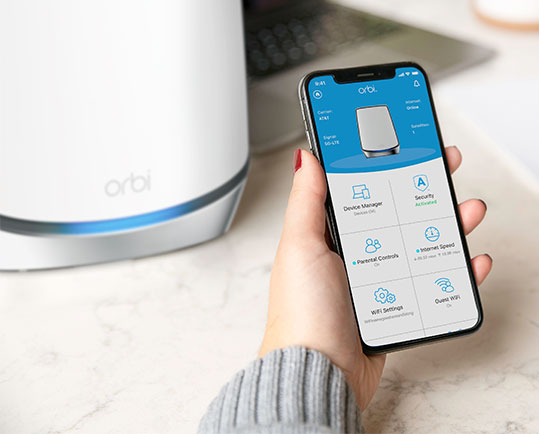
1. Connect your Orbi Mesh Router to your modem and place the satellites in the desired locations. The Mesh Router should be placed in the middle of your home (if possible) and the satellites should be placed around the edge of your property in order to provide optimal coverage. Get more Mesh Setup help.
2. Once devices are placed, use the Orbi app or browser login page to configure the router and check which satellite provides the best signal in each room.
For more on mesh satellite placement tips visit – Where should I place my Orbi Mesh Satellites?
Ready to explore more? Shop our best Mesh WiFi Systems
FAQ's
What is mesh WiFi?
Mesh WiFi is a system that uses a main WiFi router plus one or more satellites to extend a single WiFi network over a larger area, reducing dead spots and keeping coverage consistent as you move around.
How does mesh WiFi work?
Mesh WiFi works by having the router and satellites cooperate as “nodes” that relay data across the network, then connect your phone/laptop to the node with the strongest signal in that spot for a seamless handoff.
What’s the difference between a mesh WiFi system and a WiFi extender?
A mesh WiFi system creates one unified network (one WiFi name/login) using a router + satellites, while a WiFi extender rebroadcasts your existing router’s signal and is typically configured as an add-on—often with more manual setup and less seamless roaming.
What is a mesh router, and what do mesh satellites do?
A mesh router is the main unit that connects to your modem and manages the entire WiFi network; mesh satellites extend coverage deeper into the home, but they rely on the mesh router to function as part of the system.
What is “backhaul” in mesh WiFi, and why does it matter?
Backhaul is the link between the mesh router and satellites (wired or wireless), and it matters because it sets the ceiling for how much speed and capacity satellites can deliver to your devices in those rooms.
What range can mesh WiFi cover?
Mesh WiFi coverage varies by home layout and system, but mesh networks are commonly used to cover roughly 2,000 to 10,000 square feet by placing the router and satellites to create overlapping coverage.
What is mesh WiFi?
Mesh WiFi is a system that uses a main WiFi router plus one or more satellites to extend a single WiFi network over a larger area, reducing dead spots and keeping coverage consistent as you move around.
How does mesh WiFi work?
Mesh WiFi works by having the router and satellites cooperate as “nodes” that relay data across the network, then connect your phone/laptop to the node with the strongest signal in that spot for a seamless handoff.
What’s the difference between a mesh WiFi system and a WiFi extender?
A mesh WiFi system creates one unified network (one WiFi name/login) using a router + satellites, while a WiFi extender rebroadcasts your existing router’s signal and is typically configured as an add-on—often with more manual setup and less seamless roaming.
What is a mesh router, and what do mesh satellites do?
A mesh router is the main unit that connects to your modem and manages the entire WiFi network; mesh satellites extend coverage deeper into the home, but they rely on the mesh router to function as part of the system.
What is “backhaul” in mesh WiFi, and why does it matter?
Backhaul is the link between the mesh router and satellites (wired or wireless), and it matters because it sets the ceiling for how much speed and capacity satellites can deliver to your devices in those rooms.
What range can mesh WiFi cover?
Mesh WiFi coverage varies by home layout and system, but mesh networks are commonly used to cover roughly 2,000 to 10,000 square feet by placing the router and satellites to create overlapping coverage.