To log in to your NETGEAR router, there are 2 methods available. The easiest Method is the Nighthawk app. Alternatively a Router login page for Netgear Nighthawk Login can also be accessed at www.routerlogin.net with a web browser. Read on to learn more.
Note: The article below is a general informational guide only. If detailed troubleshooting or technical support is needed, visit our Routerlogin.net Not Working - Support Article instead.
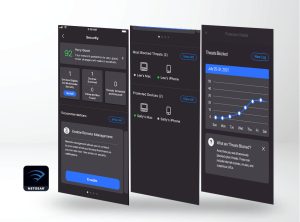
To log in to your Netgear Nighthawk router, there are 2 methods available. The first, and easiest, is using the Nighthawk app. This app, which can be downloaded from the App Store or Google Play, offers a user-friendly interface that gives access and control over your router directly from your smartphone or tablet. For more information on the Nighthawk App’s capabilities, please refer to this page.
Alternatively, the router’s login page can be accessed via a web browser. This method allows you to configure your router, update your WiFi password and firmware or establish parental controls. To access the router login page, follow the steps below.
Steps for Router Login:
Connect Your Device: This can be done either wirelessly or via an Ethernet cable. Ensure that the connection is to your router’s WiFi network.
Login Credentials: The default username is usually ‘admin’ and the password ‘password’. Alternatively, look on the bottom of the unit for your specific admin and password combination. If these have already been customized, use your unique credentials.
You should now see the router login page, where you can access your router settings and features.
If you have any issues logging in to your router, here are some tips that might help:
Clear your browser’s cache and cookies. These files might interfere with the login process and cause errors or timeouts.
Ensure your device is connected to the correct network. If you have multiple routers or extenders in your home, make sure you are connected to the one you want to log in to.
Check for IP address conflicts. If another device on your network has the same IP address as your router, you might not be able to access the router’s web address. To resolve this issue, you can change the IP address of your router or the other device.
Update your firmware. Outdated firmware might cause login issues or prevent you from accessing some features of your router. You can often update your firmware your router Firmware via the Nighthawk App. Learn more about updating NETGEAR firmware in the knowledge base. You can also directly download firmware for your device from the NETGEAR Download Center.
In some cases a factory reset may need to be performed, especially if login credentials are lost. Learn more on this page.
For additional information on how to access your NETGEAR Nighthawk router login page, visit the knowledgebase page.
Nighthawk App Router Access Method
Learn more about setting up your Nighthawk WiFi 7 Router by watching the video below:
1. Download the Nighthawk app at nighthawk-app.com.
2. Ensure your mobile device is connected to your NETGEAR router’s WiFi network.
3. Open the Nighthawk app and sign in with your NETGEAR account details and start managing your settings.
Note: NETGEAR Genie app. Unsupported. Some product documentation might recommend the “Genie App” for firmware and other router settings however, it is no longer supported and it is recommended to instead use the Nighthawk App.
We hope this guide helped you log in to your NETGEAR router seamlessly. If you have any questions or feedback, please feel free to contact us at this page. Thank you for choosing NETGEAR!
Router Login: Frequently Asked Questions
How can I access my NETGEAR router login page?
To access your router’s login page, connect your device to the router’s WiFi network. Then, open a web browser and go to www.routerlogin.net, www.routerlogin.com, or enter the router’s IP address (commonly 192.168.1.1 or 192.168.0.1) in the address bar.
What are the default login credentials for NETGEAR routers?
The default username is typically admin, and the default password is password. However, check the label on the bottom or back of your router for the specific login details for your device.
Can I use the Nighthawk app instead of a web browser to access my router?
Absolutely! The Nighthawk app is the easiest way to manage your router. Download it from the App Store or Google Play to access and control your router directly from your smartphone or tablet.
What should I do if the router login page isn’t loading?
If the login page won’t load:
Clear your browser’s cache and cookies.
Ensure your device is connected to the correct WiFi network.
Double-check that you’re using the correct IP address or web address.
How do I access my Orbi mesh system?
You can manage your Orbi mesh system by downloading the Orbi App or visiting orbilogin.com in a web browser.
What if I’ve forgotten my router login credentials?
If you’ve forgotten your login details, you may need to perform a factory reset on your router. This will restore the default username and password, which you can find on the router’s label.
Should I update my router’s firmware if I’m having login issues?
Yes, outdated firmware can cause login problems. You can update your router’s firmware using the Nighthawk App or by visiting the NETGEAR Download Center on the official website.

 When it comes to
  The
The