IN THIS ARTICLE
- Unlocking the True Power of the Nintendo Switch 2
- What is Nintendo Switch 2?
- The WiFi 6 & 7 Advantage: A Perfect Match for Next-Gen Gaming
- WiFi 7 - The Ultimate Setup for Gaming at Home
- Unleash Your Switch 2 for High-Performance Gaming on the Go
- How Will You Level-Up Your Nintendo Switch 2 WiFi?
- Frequently Asked Questions (FAQs)
Unlocking the True Power of the Nintendo Switch 2
The Nintendo Switch 2 improves on the original in almost every way, with upgrades across the board—and a few tradeoffs.
Nintendo Switch 2 Key Improvements
- Better Display: The Switch 2 boasts a larger 7.9-inch 1080p LCD screen with a 120Hz refresh rate, compared to the original’s 6.2-inch 720p screen. The result —a brighter and sharper display for handheld gameplay.
- Smoother Performance: Switch 2 includes custom Nvidia Ampere GPU and a more powerful CPU, delivering up to 4K HDR output when docked to a USB port.
- More Storage & RAM: Significant improvements over the previous version include 256GB of internal storage (vs. 32GB) and 12GB of RAM (vs. 4GB) for faster load times and more room for games.
- New Joy-Con 2 Controllers: The new Switch 2 controllers attach magnetically, with better ergonomics.
- Improved Audio & Chat: Nintendo Switch 2 has louder speakers, a noise-canceling mic, and a new “C Button” for voice and video chat for a more social experience.
- Backward compatibility: Most original Switch games work just fine on the Switch 2, so your game library isn’t left behind.
- WiFi 6 Support: Upgraded WiFi (From WiFi 5) with less lag and faster downloads, forward compatible with WiFi 7.
- WiFi 2.4Ghz & 5Ghz Support: Nintendo Switch 2 can connect to 2.4Ghz WiFi and faster 5Ghz WiFi. Note: WiFi 6Ghz band is not supported on the Switch 2.
Nintendo Switch 2 Tradeoffs
- Battery Life: Slightly shorter battery life of 2 to 6.5 hours compared to the original’s 4.5 to 9 hours, depending on the game.
- Screen Material: Reportedly switch and Switch 2 have plastic screens, making them more scratch-prone than OLED devices.
- Screen Motion Blur: Some reviews have mentioned that the Switch 2 screen can become a bit blurry during fast motion. We think it’s great, but if this concerns you, check out a store demo first!
What is Nintendo Switch 2?
The Nintendo Switch is a hybrid video game console that blends both handheld and home gaming in a single unit. Nintendo Switch is one of the most popular consoles worldwide, and Switch 2 takes handheld gaming to the next level of performance. You can play switch three ways—handheld mode, docked to a TV, or in tabletop mode. The Joy-Con controllers can be detached for multiplayer games. Supported Switch 2 games include Mario Kart World, Pokémon Legends, Cyberpunk 2077, and The Legend of Zelda: Tears of the Kingdom.
The WiFi 6 & 7 Advantage: A Perfect Match for Next-Gen Gaming
Following on from WiFi 5, WiFi 6 has been a genuine game-changer for next-gen gaming.
WiFi 6 innovations for gamers include:
- Lower Latency for quicker reaction times and faster gameplay.
- Higher Speeds to handle massive downloads, updates, and real-time action.
- Better Multitasking for connecting multiple WiFi devices at once without slowing down.
- Improved Security with WPA3, the latest security protocol for safer gaming sessions.
- Access to More Games with built-in VPN support on some WiFi 6 routers.
Would owning a WiFi 7 router be better for Switch 2?
WiFi 7 routers are the latest standard, building on WiFi 6 and WiFi 6E technologies. NETGEAR WiFi 7 routers are backward compatible, so your Switch 2 will still connect just fine and enjoy some WiFi 7 benefits. Nintendo Switch 2 won’t get the full WiFi 7 router benefits like ultra-low latency or multi-link operation, but other WiFi-7-enabled devices in your network will, making a WiFi 7 router a smart future-proofed upgrade.
Feeding the Beast: Downloading Massive 4K Game Files
The new Nintendo Switch 2 can handle 4K gaming, but only when docked (connected) to a compatible TV. It supports up to 4K resolution at 60 frames per second. If you’re downloading the Switch 2’s larger games with high-resolution graphics, ensure a stable internet connection and use a high-capacity microSD card. You should also manage storage by archiving or deleting games you’re not currently playing.
From 4K to 120fps: Why Low Latency is Non-Negotiable
When you’re pushing the limits of gaming visuals, fast internet speed with low latency isn’t just a luxury, it’s a necessity. When you’re trying to time the perfect drift-turn in Mario Kart World… even a few milliseconds of delay can mean the difference between winning and losing. Low latency WiFi connections ensures your reactions are in sync in real time for a competitive edge and a more immersive experience. See how Gamestream built its cloud gaming service on NETGEAR to deliver smooth, lag-free gameplay worldwide.
WiFi 7 - The Ultimate Setup for Gaming at Home
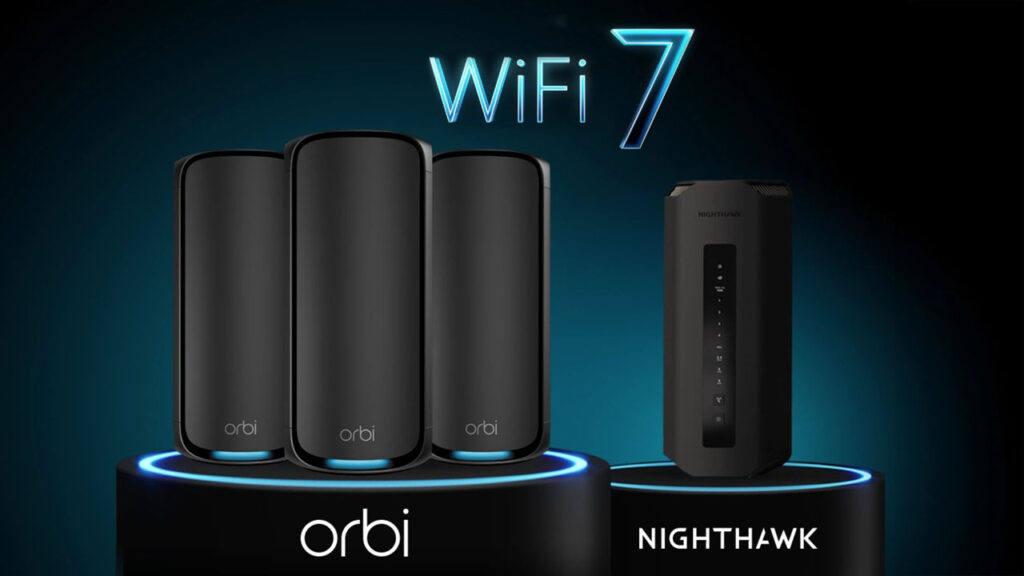
For smooth gameplay, more bandwidth, and prioritized gaming traffic without lag, you can’t beat WiFi 7 routers. These are next-gen routers, able to accommodate the latest WiFi-7 enabled devices and consoles as they enter the market.
Future Proof Your Switch 2 with a Nighthawk WiFi 7 Router
Peak performance WiFi 7 gives you a winning advantage on Nintendo Switch 2 and other gaming devices. An upgrade to a Nighthawk WiFi 7 router is the best first step toward superior home network performance for all your devices. The quality Nighthawk WiFi 7 router range has a high-performance product for every price bracket, allowing everyone to enjoy 4K/8K streaming, high-definition gaming in real time, and video conferencing without lag or buffering.
For Whole-Home Coverage (Even in the Basement): Orbi Mesh WiFi 7 Systems
For gamers who like to be tucked away for private, dedicated gaming, Orbi 970 Series Mesh WiFi 7 Systems are the answer. These mesh networks include the main router and router satellites so you can enjoy seamless gaming anywhere in the home, even in the basement, game-room, or previous WiFi dead zones.
TIP: Competitive gamers go wired! Skip the WiFi entirely for microsecond ping. Using your Switch 2 Dock’s LAN port can be a smart way to boost your device’s internet performance and stability. Learn how to Optimize your Router for Gaming.
Unleash Your Switch 2 for High-Performance Gaming on the Go
Nintendo Switch 2 is portable, making it perfect for travel and vacations. You can bring games to life with a larger 1080p screen or connect to a TV and play in up to 4K resolution. Switch 2 supports HDR, VRR, and frame rates up to 120 fps for vivid color, clarity, and smooth gameplay.
The Problem with Public WiFi and Phone Tethering
Public WiFi and phone tethering offer handy alternatives to connect to the internet when you’re on the move, but there are potential downsides. These include security risks, data drain, less stable connections, and uncertain device compatibility. How to improve your Internet on Nintendo Switch 2 while away from home? Use a NETGEAR Nighthawk Hotspot Router.
The Solution: Your Personal, Secure WiFi Bubble with the Nighthawk M6 Mobile Hotspot
Devices such as the Nighthawk M6 Mobile Hotspot offers strong and reliable 5G internet with speeds up to 2.5Gbps and the ability to connect up to 32 devices simultaneously making hotel online multiplayer gaming parties a reality. It features a long-lasting rechargeable battery and is compatible with major broadband WiFi networks, making it ideal for both home and on-the-go gaming at its best. Connect with a Nighthawk mobile hotspot for Switch online.
How Will You Level-Up Your Nintendo Switch 2 WiFi?
The extensive NETGEAR range of WiFi routers, mesh systems, and mobile hotspots has the right product for every gaming style and price point. We are a favorite US WiFi brand for all the right reasons.
- Choose a Nighthawk Router If you are a competitive gamer who prioritizes the lowest possible latency.
- Choose an Orbi Mesh System If you have a large home or family and need consistent speed everywhere.
- Choose a Nighthawk Mobile Hotspot If you travel frequently and demand a secure, high-performance connection.
Frequently Asked Questions (FAQs)
What is Quality of Service (QoS) and why does it matter for the Switch 2?
QoS is a networking feature that manages and prioritizes data traffic to ensure that voice, video, and gaming packets get through quickly and reliably. For Nintendo Switch 2, QoS can make a noticeable difference in online gaming performance depending on your Internet connection quality.
Can I use my old router with the Nintendo Switch 2?
Yes, but for larger downloads, improved latency, and a better overall gaming experience an upgrade to a NETGEAR WiFi 6 router (or WiFi“>WiFi7)
Does the Nintendo Switch 2 support WiFi 6?
Yes, it does. Nintendo Switch 2 is optimized to work seamlessly with high-quality WiFi 6 routers and mobile hotspots.
Can I play my Switch 2 on public WiFi?
You certainly can, but to ensure highest levels of encrypted security and optimal gaming speeds with low latency, connect via a Nighthawk WiFi 6 hotspot router.
What's the best way to download Switch 2 games faster?
If you’re using the Switch 2 dock, consider plugging in a LAN adapter. Wired connections are usually faster and more stable than WiFi. If using a WiFi connection, make sure your console is close to the router or mesh satellite. Note that maxim download speeds are determined by your ISP, Modem and other factors.
Is the LAN port on the new dock faster than using WiFi 7?
Wanting a Switch 2 wired connection? The wired LAN USB-C ports offer a great Nintendo Switch 2 lag fix to improve Switch 2 connection speeds. Alternatively, WiFi 7 is blazing-fast and backward compatible, making it a great option for multi-gigabit speeds and high-bandwidth gaming devices.
Is a mobile hotspot better than phone tethering for gaming?
Mobile hotspots are better for gaming. Mobile Hotspot Routers typically support more devices and have more security options than the hotspot mode on your phone. NETGEAR Hotspots have better support for things like VPN, parental controls, and port forwarding.
Will a better router help me download games from the Nintendo eShop faster?
If your internet plan is fast but your current router is outdated, a WiFi 6 or WiFi 7 router connected wirelessly or via an ethernet cable will improve your download speeds, reduce interference, and give your Switch a stronger, more stable connection.