
Search results for: GS510TPP
6 Items
Sort by
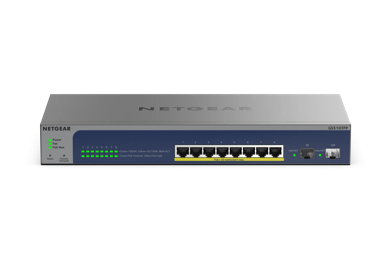
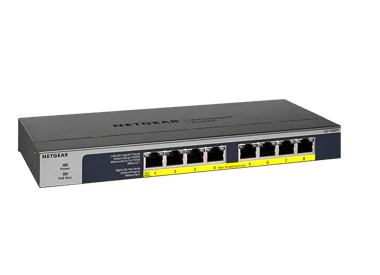
£116.99
8-Port Gigabit Ethernet High-power PoE+ Unmanaged Switch with FlexPoE (123W)current price £116.99
£139.99
8-Port Gigabit PoE+ Ethernet Smart Switch with 2 SFP Ports and Cloud Management (55W)current price £139.99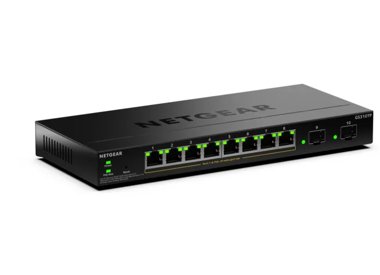


Showing 1-6 of 6
191 Items
Sort by
Knowledge Article
GS510TPP Firmware Version 7.1.0.5 - NETGEAR Support
Enhancements: The NETGEAR Switch Discovery Protocol (NSDP) that is used by NETGEAR Switch Discovery Tool (NSDT) for PCs is removed. Known Issues: The existing password format of firmware version 7.0.0.9 and version 7.0.0.10 is incompatible with version 7.0.0.24 and later versions if the length is greater than 15 characters. Workaround: Change the password to the default setting “password” before you upgrade the firmware from version 7.0.0.9 or 7.0.0.10 to version 7.0.0.24 or a newer version. War...
Knowledge Article
GS510TPP Firmware Version 7.1.0.4 - NETGEAR Support
New Features: Supports NETGEAR Insight remote management (for GS510TPP model only, Insight is not supported by GS510TLP and GS418TPP). Insight offers additional features and add-on services that are not available in standalone mode: Insight Cloud Portal: Lets you configure and manage the switch remotely through the portal of the Insight cloud-based management platform. Insight app: Lets you configure and manage the switch remotely from your iOS or Android mobile device. The app connects to the I...
Knowledge Article
GS510TPP Firmware Version 7.1.0.7 - NETGEAR Support
Bug Fixes: Fixes the issue where the uplink ports might be reported incorrectly to the Insight Cloud Server. Known Issues: The existing password format of firmware version 7.0.0.9 and version 7.0.0.10 is incompatible with version 7.0.0.24 and later versions, if the length is greater than 15 characters. Workaround: Change the password to the default setting “password” before you upgrade the firmware from version 7.0.0.9 or 7.0.0.10 to version 7.0.0.24 or a newer version. Warnings: Read and follow...
Knowledge Article
GS418TPP / GS510TLP / GS510TPP Firmware Version 7.0.0.24 - NETGEAR Support
Security Fixes: Various security vulnerability fixes and enhancements. Known Issues: The stored password format of v7.0.0.9 and v7.0.0.10 is incompatible with v7.0.0.24 if the length is greater than 15 characters. Workaround: Please change password to default “password” before upgrading the firmware from v7.0.0.9 or v7.0.0.10 to v7.0.0.24 or newer version. Firmware Update Instructions: Download Link: https://www.downloads.netgear.com/files/GDC/GS418TPP/GS510TPP_GS510TLP_GS418TPP_V7.0.0.24.zip To...
Knowledge Article
GS418TPP / GS510TLP / GS510TPP Firmware Version 6.6.2.6 - NETGEAR Support
New Features and Enhancements: Initial Release GS418TPP, GS510TLP and GS510TPP support the latest Smart Control Center, please use SCC version 1.1.3.4 for switch discovery, basic configuration and FW upgrades. Download Link: http://www.downloads.netgear.com/files/GDC/GS418TPP/GS418TPP_GS510TLP_GS510TPP_V6.6.2.6.zip Notes: The USB storage device that you attach to the USB port must comply with the following requirements: - The USB device must support USB 2.0. - The USB device must support the FAT...
Knowledge Article
GS418TPP / GS510TLP / GS510TPP Firmware Version 7.0.0.31 - NETGEAR Support
Security Fixes: Various security vulnerability fixes and enhancements. Bug Fixes: HTTPS page grays out after enabling or disabling HTTPS from HTTP session in Internet Explorer Alert message fails to display when a user is locked out due to consecutive login failures Unable to add SNMPv3 user in German and Japanese languages False alert message is triggered while setting configuration in the Switching > LAG > Advanced > LAG Configuration page Known Issues: The stored password format of v7.0.0.9 a...
Knowledge Article
GS418TPP / GS510TLP / GS510TPP Firmware Version 6.6.2.8 - NETGEAR Support
New Features and Enhancements: Added error correction code to address potential bad block of NAND FLASH memory. Notes: The released zip contains switch firmware and MIB files. Please unzip the file to extract the switch image for firmware upgrade. Upgrade Procedure: Download the new firmware 6.6.2.8 from NETGEAR product support Website and store it in local PC, and remember its location in the PC’s file system. Then unzip it to get the switch image of .stk format. Download Link: http://www.downl...
Knowledge Article
GS418TPP / GS510TLP / GS510TPP Firmware Version 6.6.2.7 - NETGEAR Support
Bug Fixes: Multicast packet with destination MAC address of 01:80:c2:00:00:1c and Ethernet type of 0x88CC causes loop in properly converged STP topology. Debugging URL of ‘devshell’ is accessible without authentication. New Features and Enhancements: To enhance HTTPS security, change default setting for SSLv3 to disabled. Notes: The released zip contains switch firmware and MIB files. Please unzip the file to extract the switch image for firmware upgrade. Upgrade Procedure: Download the new firm...
Knowledge Article
GS418TPP / GS510TLP / GS510TPP Firmware Version 7.0.0.11 - NETGEAR Support
New Features and Enhancements: In addition to English, the local browser interface now supports German (Deutsch) and Japanese Bug Fixes: The format of stored password in firmware v7.0.0.9 and v7.0.0.10 is incompatible with previous versions. Firmware v7.0.0.11 is now compatible with older versions, with the exception of v7.0.0.9 and v7.0.0.10 when password length is greater than 15 characters. Known Issues: The stored password format of v7.0.0.9 and v7.0.0.10 is incompatible with v7.0.0.11 if th...
Knowledge Article
GS418TPP / GS510TLP / GS510TPP Firmware Version 6.6.2.9 - NETGEAR Support
New Features and Enhancements: Invalid SNMP request could cause the switch to reboot. There is a chance that the device cannot be found by Smart Control Center (SCC Utility) if there is a frequent switching between DHCP IP address and Default IP. Notes: In order that CoS interface shaping rate can support up to max bandwidth, CoS interface shaping rate range is changed from 16-16384 to 0-100. Therefore, CoS interface shaping rate settings will be reset after firmware is upgraded to v6.6.2.9. The...
Knowledge Article
GS418TPP / GS510TLP / GS510TPP Firmware Version 7.0.0.20 - NETGEAR Support
New Features and Enhancements: Default “password” must be changed when you log into the switch for the first time. To configure SNMPv3, Authentication Protocol must be configured as MD5 or SHA. The ‘none’ option for Authentication Protocol is no longer allowed. Change the default setting for Smart Control Center (SCC) management from enabled to disabled. Note: SCC Utility can still discover the switch. Known Issues: The stored password format of v7.0.0.9 and v7.0.0.10 is incompatible with v7.0.0...
Knowledge Article
NMS300 Software Release 1.6.0.3 - NETGEAR Support
This release notes contains features and known issues for Netgear NMS300 Network Management Software release 1.6.0.3 Enhancement on 1.6.0.3: Add supported models: GS418TPP GS510TLP GS510TPP GS724TPv2 NMS300 Known issues and limitations Some older managed switches do not support all features available in NMS300. Short Message Service (SMS) functionality is only working in P.R China, all of other countries or regions don’t support it. This release doesn’t support uploading multiple MIB files at th...
Knowledge Article
NETGEAR Insight Cloud Portal and App version 7.3 - NETGEAR Support
< Insight 7.4 Insight 7.2 > NETGEAR Insight Cloud Portal version 7.3.2 version 7.3.2 Version 7.3.3 Version 7.3.2 Release Date: March 30, 2024. New Features: PR60X/PR460X supports IPSec VPN client-to-site tunnels, up to 60 combined client-to-site and site-to-site IPSec VPN tunnels, and up to 32 VLANs. Supports model GS510TPP, 8-Port Gigabit High Power PoE+ Smart Managed Pro Switch with 2 SFP Ports (190W). Adds Sri Lanka WiFi channels for the WAX610 and WAX620 APs. Supports up to three target firm...
Knowledge Article
UKCA Declarations of Conformity - NETGEAR Support
Please click on the Model to view Declarations of Conformity. Model A6100 A6150 A6210 A7000 A7500 A8000 A8500 A9000 ACC761 / ACC763 / AXLC761 / AXLC763 ACM761 / ACM762 / AXLM761 / AXLM762 AFT402 AGM731F AGM732F AGM734 APM408 / APM402 APS150W APS250W APS254W APS299W APS350W APS550W APS600W / APS1200W APS600Wv2 APS600Wv3 APS920W APS1000W APS1200Wv2 APS2000W APS2000Wv2 AXC761 AXC7610 AXC7615 AXC7620 AXC763 AXC765 AXC767 AXM761, AXM762, AXM763, AXM764, AXM765 AXM765v2 BR200 CSM4532 EAX12 EAX17 EAX20...
Knowledge Article
UK PSTI Declaration of Conformity - NETGEAR Support
On 29th April 2024, the United Kingdom’s Product Security and Telecommunications Infrastructure (UK PSTI) Act takes effect. The UK PSTI Act requires consumer networking devices to meet increased security standards with the stated goals of reducing cyber attacks and better protecting individual privacy and security. All NETGEAR products sold in the UK comply with the applicable security requirements that the UK PSTI Act defines. To view the UK PSTI Act Declaration of Conformity for a NETGEAR prod...
Security Advisory
Security Advisory for Pre-Authentication Buffer Overflow on Some Switches, PSV-2022-0016 - NETGEAR Support
Associated CVE IDs: None First published: 11/7/2022 NETGEAR has released fixes for a pre-authentication buffer overflow security vulnerability on the following product models: GS728TX fixed in firmware version 6.6.4.28 GS728TXP fixed in firmware version 6.6.4.28 GS752TX fixed in firmware version 6.6.4.28 GS752TXP fixed in firmware version 6.6.4.28 GS724Tv4 fixed in firmware version 6.3.1.43 GS748Tv5 fixed in firmware version 6.3.1.43 GS716Tv3 fixed in firmware version 6.3.1.43 GS324T fixed in fi...
Security Advisory
Security Advisory for Authentication Bypass and Remote Command Execution on Some Smart and Managed Switches, PSV-2017-0857 - NETGEAR Support
NETGEAR is aware of a security issue that can allow an attacker to access the debugging URL of some models of Smart and Managed Switches without first authenticating. After accessing the debugging URL, the attacker can then execute commands on the switch, such as resetting or restarting the switch. This attack can only be executed remotely if the switch itself can be accessed remotely; for most users, a firewall will block access from outside the local network. This vulnerability affects the fol...
Knowledge Article
EU Declarations of Conformity - NETGEAR Support
Please click on the Model to view Declarations of Conformity. To access EU Declarations of Conformity for Arlo products, visit https://kb.arlo.com/000061839/EU-Declarations-of-Conformity-for-Arlo-and-VueZone. Model 6000451 A6100 A6150 A6210 A7000 A7500 A8000 A8500 A9000 ACM761 / ACM762 / AXLM761 / AXLM762 ACC761 / ACC763 / AXLC761 / AXLC763 AC785S AC790S AC810 / AC810S AFT402 AGM731F AGM732F AGM734 AirCard 797 (AC797) APM402XL APM408 / APM402 APS150W APS250W APS254W APS299W APS350W APS550W APS60...
Knowledge Article
GS110TPP Firmware Version 7.0.1.16 - NETGEAR Support
New Features: All features per NETGEAR Smart Managed Pro Switches. For more details, please visit https://www.netgear.com/business/products/switches/smart/standalone-smart-switch.aspx Known Issues: [Diff Serv] Rule to drop ICMP packet does not work if under VLAN routing mode Download Link : http://www.downloads.netgear.com/files/GDC/GS110TPP/GS110TPP_V7.0.1.16.zip Firmware Update Instructions: To update your product’s firmware, follow the instructions in your product’s user manual. To find your ...
Knowledge Article
GS510TP Firmware Version 5.4.2.18 - NETGEAR Support
Bug Fixes: Fixed the issue of switch not able to obtain IP address from some DHCP server. This particular DHCP server requires the source address from the DHCP discovery packet to be 0.0.0.0. Fixed the issue of stronger key (bigger than 2048 bits) can’t be downloaded to the switch. Fixed the issue where switch receives SNTP KISS OF DEATH from SNTP server, switch will no longer contact the SNTP server for time update. Known issues: Port PVID (Switching > VLAN > Advanced > Port PVID Configuration)...
Showing 1-20 of 191
248 Items
Sort by
Discussion Post
Hello, can I be provided with the ECCN and CCATS details for GS510TPP please? | NETGEAR Communities
Hello, can I be provided with the ECCN and CCATS details for GS510TPP please?
Discussion Post
Netgear GS510TPP - simple VLAN question | NETGEAR Communities
I started monitoring my home letwork traffic using ntopng. I connected the ntopng monitoring interface to port 8 on my switch which is the probe port for the...
Discussion Post
GS510TPP Change VLAN Membership via SNMP | NETGEAR Communities
Hello, i want to set VLAN membership using SNMP PVID works just fine using the OID 1.3.6.1.2.1.17.7.1.4.5.1.1.{port} and setting the...
Discussion Post
Connecting GS510TPP PoE Switch not using SFP Port | NETGEAR Communities
I have a Netgear Pro Safe GS510TPP PoE switch to network IP security cameras. Switch will be located in a closet and connected to home router via Cat6 approx...
Discussion Post
GS510TPP Default password does NOT work anymore after firmware upgrade | NETGEAR Communities
I just upgraded the firmware to the latest version and now my password to access the switch doesn't work anymore. Factory reset and configure everything from...
Discussion Post
gs510tpp ports losing connection to network | NETGEAR Communities
I have a strange problem. Had a bunch of RUKUS R510 ap's connected to the poe switch for over 5 weeks on a bench, all working fine, devices connecting to the...
Discussion Post
M4300- multiple VLANs connected to GS510PP | NETGEAR Communities
Hello, I'd to connect port 48 of an m4300 to port 1 of a GS510tpp. I have 5 vlans. VLAN 10 is my default vlan for all wiring...
Discussion Post
GS716TPP loose connection after 4 hours | NETGEAR Communities
Hi We have recently installed a new GS716TPP|16 port, firmware: 1.0.4.1. It constantly looses connection after 4 hours. It is connected to a GS510TPP 8...
Discussion Post
Cannot access GS110TPP after reset | NETGEAR Communities
I purchased a used GS110TPP which I need for its PoE features and performed a factory reset by pressing the reset button on the front panel for more than 5...
Discussion Post
ACL to protect telnet or ssh on GS110TPP | NETGEAR Communities
Hi all, I have a GS110TPP on firmware 7.0.9.12.From reading and experimentation I have figured out that the unit has both a telnet server...
Discussion Post
Per-port PoE stats for GS110TPP (SNMP) | NETGEAR Communities
Hi all,In the web UI for the GS110TPP I can see power stats such as "Output Voltage" for each port; just go to: System > PoE > Advanced > PoE...
Discussion Post
restart one PoE port with SNMP on GS510TP using good OID/MIB | NETGEAR Communities
I have found how to restart just one PoE port (the 6th amoung 8) with SNMP on Netgear GS510TP and it must work with many others switches (1 is for up and 2...
Discussion Post
Why would the Switch GS110TPP not recognize PoE devices ? | NETGEAR Communities
Using GS110TPP under Ubuntu 18.04LTS. The Switch is detected by the computer but none of the ports have managed to power up my camera.I need to say that...
Discussion Post
GS510TLP intermittent connection loss | NETGEAR Communities
Have multiple VLANs setup which supply (supposed to anyways) internet to multiple tenants. Most of the time it is working but having multiple drops...
Discussion Post
GS510TLP (and other POE switches): Timer Schedules - WHERE do we specify POE action of ON/OFF? | NETGEAR Communities
I have been doing IT for over 30 years, but find Netgear's implementation of Timer Schedules (as relates to switching a port's POE power on/off) has me...
Discussion Post
GS110TPP already registered and Support is responsive ! | NETGEAR Communities
Hi,I bought a GS110TPP from amazon. I'm unable to logon and register as it states that the switch is already registered to another email (seems that it...
Discussion Post
GS108Tv3 / GS110TPv3 / GS110TPP - Can you turn On / Off IEEE 802.3az support? | NETGEAR Communities
Hello I am a longtime user and fan of Netgear switches and have bought/specified hundreds of them over the years. I can't find in any Netgear manual if...
Discussion Post
GS108Tv3/GS110TPP 7.0.5.2 Firmware Update 2x Bugs | NETGEAR Communities
I have a GS108Tv3 and GS110TPP and upgraded the firmware from 7.0.5.2 on both today. I don't have a support contract, but the newest firmware has...
Discussion Post
GS110TPP auto-ds continuing shutting down port/s | NETGEAR Communities
I have a GS110TPP with a TLink WR1043NDv2 (OpenWRT 19.5) connected as an Access Point.The point the wr1043nd keeps shutting down if i use the auto-ds...
Discussion Post
GS110TPP QoS managed and EEE managed option | NETGEAR Communities
Hi I'm considering the purchase of Netgear GS110TPP switch, for use with Dante audio network.I would like to know if through the QoS management is possible...
Showing 1-20 of 248
We couldn’t find anything for "GS510TPP".
Showing 0-0 of 0
5 Items
Manage Your Network Easier with NETGEAR Smart Switch CLI
Simplify network management with NETGEAR Smart Switch CLI. Configure, monitor, and troubleshoot your switches all from one place.
Introducing the NETGEAR S350 Series v2: Powerful PoE+ Smart Switches - NETGEAR Blog
The NETGEAR S350 Series v2 Gigabit PoE+ Smart Managed Essentials Switches are designed to give growing organizations enterprise-grade capabilities - without the complexity or cost that usually comes with them.
NARL Builds a High-Availability, High-Throughput Network Powered by NETGEAR - NETGEAR Blog
Discover how NARL built a high-availability, high-throughput research network using NETGEAR MLAG to enable nonstop, petabyte-scale scientific data processing.
NETGEAR's Dual Band WiFi 6: Redefining Connectivity
Discover how NETGEAR's Dual Band WiFi 6 is redefining connectivity, offering faster speeds, increased capacity, and improved efficiency.
Tri-band WiFi 6E Access Point - Enhancing Wireless Networks
Learn about the Tri-band WiFi 6E Access Point and how it's enhancing wireless networks. NETGEAR offers cutting-edge solutions for your connectivity needs.
Showing 1-5 of 5