IN THIS ARTICLE
- The Smart Home Paradox: More Convenience, More Digital Doors to Protect
- The Allure of WiFi Cameras and Smart Locks
- Every Connected Device is a Potential Entry Point for Hackers
- The Weakest Link: Why Your Standard Router Isn't Enough
- The Solution: Building a Digital Fortress with a True Network Firewall
- Going Beyond a Password: The Need for Active Threat Protection
- Introducing NETGEAR Armor: Your 24/7 Security Guard for Everything Connected
- How NETGEAR Armor Specifically Protects Your Cameras and Locks
- Peace of Mind in a Single Subscription
- Frequently Asked Questions (FAQs)
The Smart Home Paradox: More Convenience, More Digital Doors to Protect
It wasn’t long ago that home security systems and surveillance cameras had to be hardwired with cables and installed by security professionals. The footage was stored on video recorder tape which had to be changed daily. Times move on fast, and today’s wireless security camera systems can include color night vision, spotlight cameras, motion detection, pan/tilt, two-way audio, and improved field of view in HD video, all automated wire-free and operated remotely. But the network video recorder (NVR) convenience comes at a cost – there are more digital doors to protect from hackers.
The Allure of WiFi Cameras and Smart Locks
WiFi cameras (IP cameras) and smart locks are a home’s first line of defence against intruders looking for a point of entry. The cameras work 24/7 and can be checked, adjusted, and automated with a simple tap on your phone from wherever you are. You get real-time alerts and notifications for total peace of mind.
Every Connected Device is a Potential Entry Point for Hackers
Compare your WiFi network to a regular house. With more potential entry points than ever, complex digital networks offer numerous opportunities for cybercriminals to break in if system devices are unsecured. Things like outdated firmware, default passwords, or a lack of regular updates can leave them vulnerable.
The Weakest Link: Why Your Standard Router Isn't Enough
The router is the gatekeeper of your home network, but a standard router is comparable to a basic lock on your front door instead of a sophisticated security system. Standard routers are designed to connect devices, not necessarily to defend them.
How Hackers Exploit the “Digital Front Door” of Your Home
Can my WiFi security camera be hacked? This question is often overlooked when purchasing smart home IoT devices. Knowing how to prevent smart devices from being hacked is more important than ever. Hackers can break into devices that have:
- Limited threat detection: An unsecured router is unable to counter phishing, malware, or hackers in real time.
- Outdated firmware: Router firmware that isn’t updated can leave WiFi security cameras and other devices open to hackers.
- Minimal encryption: Standard routers often come with default passwords or minimal encryption, making them easy targets for attackers.
- No isolation between devices: If your outdoor security camera is compromised, external threats can move across your network.
- Lack of advanced monitoring: You don’t get alerts or insights that only dedicated security tools like NETGEAR Armor can offer.
Tip: Don’t reuse passwords, especially for smart home devices. Reusing passwords on smart home devices and add-ons is like using the same key for every lock in your house, then misplacing that key.
The Solution: Building a Digital Fortress with a True Network Firewall
A true network home firewall monitors, filters, and controls incoming and outgoing network traffic from wireless and ethernet wired cameras, video doorbells, floodlight cameras, dual-lens indoor cameras, smart locks, and more.
Features of a true NETGEAR network firewall
- Packet inspection: Decides whether to allow or block data packets.
- Access control: Enforces policies based on IP addresses, port numbers, protocols, etc.
- Stateful inspection: Remembers the state of active connections to make safer decisions.
- Network Address Translation: Hides internal network structures.
- Logging and alerts: Keeps a record of activity and flags suspicious behavior.

Going Beyond a Password: The Need for Active Threat Protection
The best firewalls include deep packet inspection and threat intelligence to tackle advanced attacks. Threat protection is serious business, as evidenced by national security concerns and the proposed government ban of some foreign router manufacturers. A NETGEAR next-gen firewall provides active threat detection with intrusion prevention, application awareness, and encrypted traffic inspection.
Introducing NETGEAR Armor: Your 24/7 Security Guard for Everything Connected
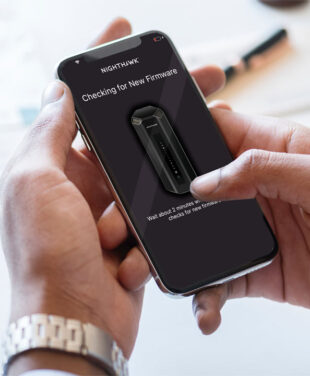
Do you want to learn how to secure your home security camera? Today’s cybersecurity threats demand advanced protection. NETGEAR Armor provides a powerful suite of tools to help keep you safe online. Armor is built into state-of-the-art NETGEAR WiFi systems, automatically helping to protect your home network devices. Armor is easily activated via the Orbi or Nighthawk app.
How NETGEAR Armor Specifically Protects Your Cameras and Locks
NETGEAR Armor offers comprehensive all-in-one protection. Armor features include:
- Automatic Shielding: Blocking threats before they reach your devices.
- Vulnerability Scanning: Identifying weak spots in your smart home.
- Instant Alerts: Get notified of any blocked threat or suspicious activity.
Peace of Mind in a Single Subscription
Powered by advanced AI, NETGEAR Armor helps secure devices connected to your WiFi while extending protection on the go through the Armor app. Defend against online threats and data thieves with multiple layers of intelligent, powerful security, including the latest WiFi cameras with superior image quality and cloud storage or local storage. Armor protects your family, your data, and your privacy.
Frequently Asked Questions (FAQs)
My security camera brand says it's "secure." Why do I still need NETGEAR Armor?
NETGEAR Armor provides an additional layer of security that isn’t provided by your ISP and smart home device maker.
How is NETGEAR Armor different from the antivirus software on my computer?
NETGEAR Armor stands out from traditional antivirus software by offering advanced network-wide protection rather than just device-level defense
Will NETGEAR Armor slow down my internet connection?
NETGEAR Armor works seamlessly with the latest NETGEAR routers, without noticeable loss of internet speed. Older routers may experience slower speeds, especially when many devices are connected.
Does Armor work with all brands of smart cameras and locks (like Ring, Arlo, Wyze, August)?
NETGEAR Armor works at the network level to protect all devices connected to your NETGEAR router. That includes security cameras, smart lock security systems, smart TVs, phones, Amazon Alexa, and more.
Is it difficult to set up and use NETGEAR Armor?
NETGEAR Armor is easy to set up and use. Simply download the NETGEAR Orbi or Nighthawk app and take award-winning protection to the next level for total peace of mind.
Can I get NETGEAR Armor on my existing router, or do I need a new one?
NETGEAR Armor is built into many of NETGEAR’s newer routers—especially models in the Orbi and Nighthawk series. You can conveniently activate Armor through the Orbi or Nighthawk app. Learn more with NETGEAR Armor Support.
You wouldn’t install a state-of-the-art lock on a door with a broken frame. In the same way, it’s unwise to connect a high-tech security camera to an unprotected network. NETGEAR Armor lets you install smart devices with the confidence in knowing your entire network is actively monitored and protected. NETGEAR Armor stands guard, so you don’t have to.
Your smart camera’s security is defined by your network’s strength. Connecting it to an unprotected network undermines its purpose and leaves your home vulnerable. NETGEAR Armor lets you install smart devices with the confidence in knowing your entire network is actively monitored and protected. NETGEAR Armor stands guard, so you don’t have to.
Don’t wait for a WiFi camera security breach to secure your smart home. Learn more about NETGEAR Armor and explore the latest Nighthawk and Orbi WiFi 7 Systems that come with this essential protection for home network security. You can trust NETGEAR for unrivaled quality and security.