What is WiFi Calling on iPhone? Your Guide to Fixing Bad Cell Signal
Picture this: You're closing a crucial deal when you move to grab documents, and your call drops mid-sentence. A majority of smartphone users experience dropped calls indoors, but there's a built-in solution you might not be using.
WiFi Calling transforms your iPhone into a connectivity powerhouse, turning any dead zone into crystal-clear communication. The secret? Your existing WiFi network virtually becomes your personal cell tower..
From understanding why dead zones occur to discovering how WiFi Calling can transform your connectivity, this guide will walk you through everything you need to know. Learn how to enable this feature, optimize your network, and ensure every call is crystal clear—no matter where you are.
The Common Frustration: When Your Home is a Cellular Dead Zone
Dead zones can happen without notice – during family emergencies, work calls, and those moments when connection matters most. While cellular towers serve millions, they can’t penetrate every basement, office building, or rural location. That’s where intelligent technology steps in to bridge the gap.
Identifying the Problem: Dropped Calls, Failed Texts, and "No Service"
A cellular dead zone occurs when your Apple iPhone or Android (Samsung Galaxy, Google Pixel, and other brands) can’t connect to a cell tower, leaving you with spotty or zero cellular coverage—no signal, calls, texts, or data. It may be that you have a bad cell signal at home or at work, and there are a few other common culprits, most of which are unavoidable, such as:
Why is your Cell Signal Weak?
Geographical features: Mountains, valleys, and dense forests can block or absorb wireless signals.
Obstacles: Buildings with concrete or metal construction materials, enclosed tunnels, and car bodies are all known culprits.
Distance from cell towers: Cell towers aren’t erected at uniform distances apart, and the farther you are from the tower, the weaker the signal.
Network congestion: In crowded areas such as major festival sites and crowded stadiums, the number of devices vying to connect can overload the system.
Weather or interference: Heavy storms create electronic interference and can damage cell towers. High call volume during emergencies can overwhelm networks when you need them most.
Your iPhone's Built-In Solution: What is WiFi Calling?
WiFi Calling has been quietly revolutionizing communication since 2007, yet remains a misunderstood and underutilized feature on mobile phones. This intelligent technology seamlessly routes calls and texts through your WiFi network when cellular signals weaken. No additional apps, no extra accounts – just enhanced connectivity built right into your device.
How it Works: Using Your WiFi Network Instead of a Cell Tower
Your iPhone becomes smarter with WiFi Calling. When cellular signals fade, your device automatically transitions to your WiFi network – seamlessly, invisibly, perfectly. This intelligent switching works across your entire Apple ecosystem, enabling calls on your iPad, Apple Watch, and Mac when your iPhone isn’t even nearby. The technology adapts to your environment, ensuring connection never becomes a barrier.
The Key Benefit: Perfect for Basements, Rural Areas, and Densely Built Offices
WiFi Calling shines brightest in dead zones where the mobile signal is unreliable or non-existent. WiFi Calling improves call quality and comes to the rescue in:
Remote or rural areas where cell tower infrastructure is sparse.
Buildings, basements, and structures made with thick concrete or metal.
Busy Airports, hospitals, and offices where WiFi is strong but cellular reception is spotty.
Emergency services callouts where a reliable connection is essential.
How to Turn on WiFi calling on my iPhone?
Unlock this powerful feature in under two minutes. WiFi Calling works seamlessly with all major carriers – Verizon, T-Mobile, and AT&T – requiring just four simple steps:
Step 1: Open Settings > Phone
Step 2: Tap WiFi Calling and Toggle it On
Step 3: Confirm your Emergency Address (E911)
Step 4: Confirm WiFi Calling is working by checking your iPhone’s Status Bar or phone app
Tip: WiFi Calling Technology is also available on Android phones such as Google Pixels, Samsung Galaxy and many other mobile hardware brands.
To Enable WiFi Calling on Android: Open your settings and search for “Wi-Fi Calling” then enable the feature with the toggle.
The Secret to Flawless WiFi Calls: A Rock-Solid Network
Your home WiFi network becomes the foundation for every important conversation. WiFi 7 represents the latest evolution in wireless technology, delivering unprecedented speeds and reliability. This next-generation standard transforms how your devices communicate, creating the perfect environment for crystal-clear WiFi calling. Advanced routers and mesh systems harness this technology to eliminate connectivity barriers throughout your space.
Why WiFi Calling is Only as Good as Your WiFi Signal
WiFi Calling works optimally if you have a strong WiFi network connection. WiFi Calling voice calls or facetime are routed through your internet connection instead of your cellular network, so calling clarity, reliability, and speed depend on how solid your WiFi is, plus your phone plan and the data plan your ISP carrier supports. If your WiFi signal is weak, your call might drop or lag. A strong WiFi connection should result in:
Clear audio with less data packet loss.
Low latency, so conversations feel natural.
Stable speeds that reduce call drops, choppy audio, or confusing silence.
For Maximum Reliability: The Power of a Nighthawk Router
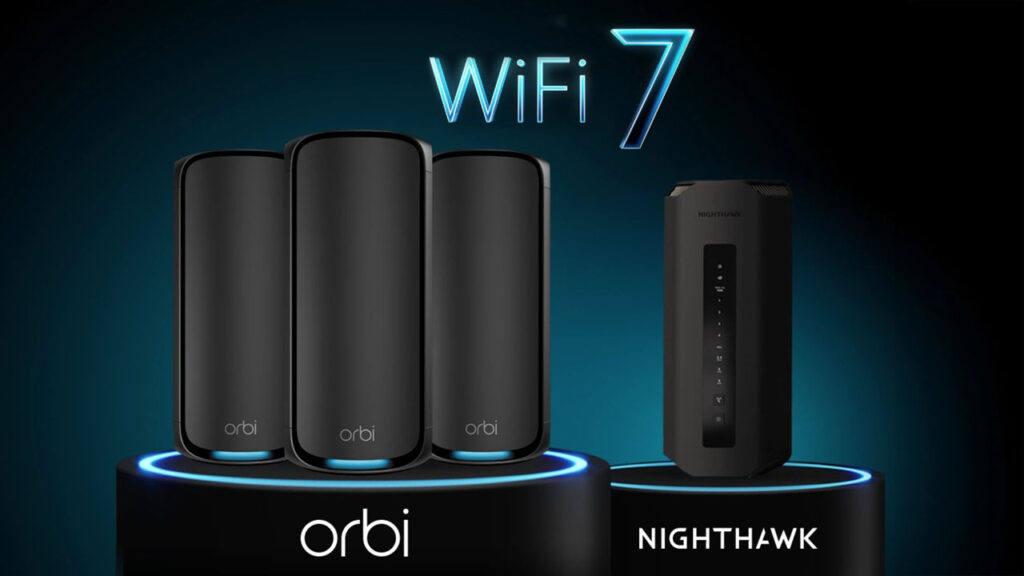
Nighthawk routers power extraordinary connectivity experiences across millions of homes. Built with cutting-edge WiFi 7 technology, these routers deliver the performance foundation your WiFi calling deserves. The Nighthawk RS700S for example – transforms network capability with speeds reaching 19Gbps while supporting up to 200 connected devices -ensuring every call connects with pristine clarity.
For Whole-Home Coverage: Ensure Every Room is Call-Ready with Orbi Mesh
Orbi Mesh systems eliminate dead zones by design. These intelligent networks create seamless connectivity throughout your entire space – from basement to backyard. The Orbi 970 Series harnesses quad-band WiFi 7 technology, delivering speeds up to 27Gbps while supporting up to 200 devices. Every room becomes call-ready, every conversation crystal clear.
Most cellphone providers treat WiFi calls the same as regular calls, meaning they are included in your plan’s calling minutes. However, calls to locations outside your plan’s coverage area may incur additional charges.
What happens if I start a call on WiFi and then leave my house?
If you leave your house mid-call, your iPhone transfers the call from the WiFi network to your cellular network, usually in a seamless handover. Your phone, your carrier, and the strength of your mobile signal all play a role.
Do I need a special plan from Verizon, AT&T, or T-Mobile to use this?
No, you don’t. As long as your phone is compatible and your account is active, you’re all set for WiFi calling.
Does WiFi calling use my cellular data?
WiFi Calling doesn’t use your cellular data. It relies on your internet connection instead of your mobile network, so calls and texts go through that connection rather than your carrier’s cellular tower network.
Is WiFi Calling secure?
WiFi calling on Verizon/AT&T/T-Mobile coupled with robust secure WiFi 7 is generally secure. Calls made over WiFi are encrypted by your mobile carrier, just like regular cell phone calls.
Can I make calls in complete cellular dead zones?
Absolutely. WiFi Calling works independently of cellular towers, enabling calls wherever strong WiFi exists. Your connection relies entirely on internet connectivity, not cellular coverage. Without a carrier plan – WiFi calling will not work, but you can still use apps like FaceTime, WhatsApp, or Zoom to call over WiFi.
Is WiFi calling better than a cell signal booster?
WiFi Calling is usually better than a cell signal booster if you have a fast and stable internet connection, and your phone and router are compatible.
Can I use WiFi Calling on my iPad or Mac as well?
Yes, you can. If your carrier supports WiFi Calling, you can make and receive calls on your iPad or Mac—even if your iPhone isn’t nearby. Reminder that your device has to support a 5g connection in this first place.
Now - You're Ready to Ditch Dropped Calls!
Transform your space into a communication command center. WiFi Calling eliminates the frustration of chasing signals and missed connections, but its power depends entirely on your network foundation. When you pair this intelligent iPhone feature with advanced networking technology, every call becomes an opportunity for crystal-clear connection. Your network doesn’t just support communication – it elevates every conversation to extraordinary clarity.
Ready to eliminate dropped calls forever? Discover how Nighthawk routers and Orbi mesh systems create the perfect foundation for flawless WiFi calling. Experience the difference when cutting-edge technology meets human connection.