
Search results for: XS508M
3 Items
Sort by

S3600 Series 10G/Multi-Gigabit Ethernet Smart Switches (XS508TM)
XS508TM
- 8 Ports
- Desktop/Wallmount/Rackmount
- 10G/Multigig
Showing 1-3 of 3
17 Items
Sort by
Knowledge Article
My NETGEAR XS505M or XS508M switch doesn’t support jumbo frames; what do I do? - NETGEAR Support
NETGEAR is aware of a problem with jumbo frame support on a limited quantity of XS505M and XS508M switches. If your XS505M or XS508M does not support jumbo frames correctly and has a serial number within the potentially affected range, contact NETGEAR Support for assistance. Potentially affected serial number range for XS505M: Serial numbers with a 7 in the position highlighted below might be affected: Potentially affected serial number range for XS508M: Serial numbers with a 7 in the position h...
Knowledge Article
What NETGEAR SFP and SFP+ modules can I use in NETGEAR XS505M and XS508M Switches? - NETGEAR Support
The XS505M and XS508M support the following SFP and SFP+ modules: Module Description AGM731 SFP Transceiver 1000BASE-SX (Short range, multimode) AGM732F SFP Transceiver 1000BASE-LX (Long range, single mode) AGM734 SFP Transceiver 1000BASE-T Copper RJ45 GBIC AXC761 10GSFP+ Cu (passive) SFP+ to SFP+ Direct Attach Cable 1m AXC763 10GSFP+ Cu (passive) SFP+ to SFP+ Direct Attach Cable 3m AXM761 10GBASE-SR SFP+ GBIC (OM3/OM4 Multimode) AXM762 10GBASE-LR SFP+ GBIC (Single mode) AXM763 10GBASE-LRM SFP+ ...
Knowledge Article
RAXE500 Firmware Version 1.0.5.62 - NETGEAR Support
New Features and Enhancements: Updates the USB driver to improve USB stability Updates the WiFi driver to improve WiFi stability Bug Fixes: Improves stability Fixes the 2.5 GbE port interoperability issue with the XS508M Security Fixes: Fixes security vulnerabilities. For more information about security vulnerabilities, visit https://www.netgear.com/about/security. Firmware Update Instructions: Download Link: https://www.downloads.netgear.com/files/GDC/RAXE500/RAXE500-V1.0.5.62_2.0.35.zip To upd...
Knowledge Article
RAXE450 Firmware Version 1.0.5.62 - NETGEAR Support
New Features and Enhancements: Updates the USB driver to improve USB stability Updates the WiFi driver to improve WiFi stability Bug Fixes: Improves stability Fixes the 2.5 GbE port interoperability issue with the XS508M Security Fixes: Fixes security vulnerabilities. For more information about security vulnerabilities, visit https://www.netgear.com/about/security. Firmware Update Instructions: Download Link: https://www.downloads.netgear.com/files/GDC/RAXE450/RAXE450-V1.0.5.62_2.0.35.zip To upd...
Knowledge Article
What are the port speeds for the NETGEAR ProSAFE 10-Gigabit/Multi-Gigabit Ethernet Unmanaged Switches? - NETGEAR Support
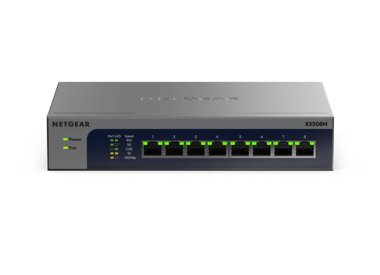
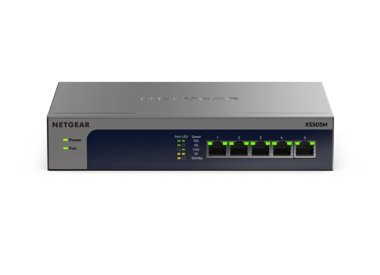
The XS505M and XS508M come with copper Ethernet ports that provide either Fast Ethernet, 1-Gigabit, 2.5-Gigabit, 5-Gigabit or 10-Gigabit connectivity, as well as an SFP+ Fiber port with 1-Gigabit or 10-Gigabit connectivity. Each port automatically detects and provides the speed required by the connected device. See the following table for the ports available on each switch: 100M/1G/2.5G/5G/10G RJ-45 Copper Ports 10G/1G SFP+ Ports XS505M 4 1 XS508M 7 1 x 10G/1G SFP+ and Copper (combo) For more in...
Knowledge Article
UKCA Declarations of Conformity - NETGEAR Support
Please click on the Model to view Declarations of Conformity. Model A6100 A6150 A6210 A7000 A7500 A8000 A8500 A9000 ACC761 / ACC763 / AXLC761 / AXLC763 ACM761 / ACM762 / AXLM761 / AXLM762 AFT402 AGM731F AGM732F AGM734 APM408 / APM402 APS150W APS250W APS254W APS299W APS350W APS550W APS600W / APS1200W APS600Wv2 APS600Wv3 APS920W APS1000W APS1200Wv2 APS2000W APS2000Wv2 AXC761 AXC7610 AXC7615 AXC7620 AXC763 AXC765 AXC767 AXM761, AXM762, AXM763, AXM764, AXM765 AXM765v2 BR200 CSM4532 EAX12 EAX17 EAX20...
Knowledge Article
EU Declarations of Conformity - NETGEAR Support
Please click on the Model to view Declarations of Conformity. To access EU Declarations of Conformity for Arlo products, visit https://kb.arlo.com/000061839/EU-Declarations-of-Conformity-for-Arlo-and-VueZone. Model 6000451 A6100 A6150 A6210 A7000 A7500 A8000 A8500 A9000 ACM761 / ACM762 / AXLM761 / AXLM762 ACC761 / ACC763 / AXLC761 / AXLC763 AC785S AC790S AC810 / AC810S AFT402 AGM731F AGM732F AGM734 AirCard 797 (AC797) APM402XL APM408 / APM402 APS150W APS250W APS254W APS299W APS350W APS550W APS60...
Knowledge Article
XS508TM / XS516TM / XS724TM Firmware Version 7.8.11.20 - NETGEAR Support
Release Date: November 21, 2025. New Features and Enhancements: Support for the UI Dark Theme option. Increase of the password length to 64 characters. Replacement of all TFTP methods with HTTP to improve reliability. Bug Fixes: Fixes the issue where you cannot remove tagged VLANs from a port, resulting in an error message. Fixes the issue where spelling and grammatical typos appear on the Firmware Update Confirmation page. Fixes the issue where the context help descriptions were incorrect for V...
Knowledge Article
XS508TM / XS516TM Firmware Version 7.8.11.13 - NETGEAR Support
Enhancements: Adds German and Japanese to the multi-language options Adds the DHCP server and DHCP relay features Adds the port mirroring feature Bug Fixes: Fixes the issue where the ACL Wizard feature doesn’t work (see Security > ACL). Fixes the issue where the default frame size displays incorrectly as 1500 instead of 1518 on the Port Configuration page (see Switching > Ports > Port Configuration). Fixes the issue where the Service Smurf denial of service (DoS) type doesn’t work (see Security ...
Knowledge Article
XS508TM / XS516TM Firmware Version 7.8.11.15 - NETGEAR Support
Bug Fixes: Fixes the issue where the Active Ports column displays only one LAG membership port instead of all port members (see Switching > LAG > LAG Configuration). Fixes the issue where you still can access the switch device UI using HTTP even though you disabled HTTP access (see System > Protocols > HTTP). Fixes the issue where the fiber ports display on the Cable Test page (see Monitoring > Ports > Cable Test). Fixes the issue where the online help description for the TFTP Firmware/File Upda...
Knowledge Article
XS508TM / XS516TM Firmware Version 7.8.11.16 - NETGEAR Support
Features and Enhancements: Bidirectional synchronization of the configuration settings between NETGEAR Insight and the device user interface (UI). Online checks for new firmware updates. Insight management mode is now enabled by default. Updates to the Dashboard page of the device UI. You can now use the new NETGEAR Discovery Tool (NDT) or the latest NETGEAR Insight app to discover the switch in the same subnet. The NDT supports UPnP, which is now the preferred method of discovery. Bug Fixes: Fi...
Knowledge Article
XS508TM / XS516TM / XS724TM Firmware Version 7.8.11.17 - NETGEAR Support
Bug Fixes: Fixes the issue where the SFP+ port connection cannot be established when the SFP+ Port Speed is set to Auto in Insight management (see Insight Web Portal > Devices > Ports > Settings). Known Issues: If you enable L2 loop protection for a port (see Security > L2 Loop Protection), after a loop is detected, the ports that are part of the loop are shut down. Workaround: There is no workaround. Download Link: https://www.downloads.netgear.com/files/GDC/S3600_Switch/XS508TM_XS516TM_firmwar...
Knowledge Article
XS508TM / XS516TM / XS724TM Firmware Version 7.8.11.21 - NETGEAR Support
Release Date: January 7, 2026 Bug Fixes: Fixes the issue with the DHCPv6 client that prevents receiving an IPv6 address after you restart the switch with IGMP Snooping enabled on VLAN 1. Known Issues: If you enable L2 loop protection for a port (see Security > L2 Loop Protection), after a loop is detected, the ports that are part of the loop are shut down. Download Link: https://www.downloads.netgear.com/files/GDC/S3600_Switch/XS508TM_XS516TM_XS724TM_firmware_V7.8.11.21.zip Firmware Update Instr...
Knowledge Article
XS508TM / XS516TM / XS724TM Firmware Version 7.8.11.19 - NETGEAR Support
Bug Fixes: Fixes the issue where the Power LED light on the front panel does not change to blue when the switch is managed by Insight. Known Issues: If you enable L2 loop protection for a port (see Security > L2 Loop Protection), after a loop is detected, the ports that are part of the loop are shut down. Download Link: https://www.downloads.netgear.com/files/GDC/S3600_Switch/XS508TM_XS516TM_firmware_V7.8.11.19.zip Firmware Update Instructions: The released .zip file contains the switch firmware...
Knowledge Article
Bi-Directional Sync on Insight-managed Smart Switches with Insight - NETGEAR Support
Insight bidirectional synchronization instantly updates the Insight cloud whenever you change settings through the device UI. If a local change affects only the switch, Insight synchronizes the change immediately. If the change affects the entire Insight network configuration, Insight does not synchronize the change. Instead, Insight sends a notification indicating that the network-level configuration changed on a specific device. The next time the switch restarts, Insight overrides the local ch...
Knowledge Article
UK PSTI Declaration of Conformity - NETGEAR Support
On 29th April 2024, the United Kingdom’s Product Security and Telecommunications Infrastructure (UK PSTI) Act takes effect. The UK PSTI Act requires consumer networking devices to meet increased security standards with the stated goals of reducing cyber attacks and better protecting individual privacy and security. All NETGEAR products sold in the UK comply with the applicable security requirements that the UK PSTI Act defines. To view the UK PSTI Act Declaration of Conformity for a NETGEAR prod...
Knowledge Article
NETGEAR Insight Cloud Portal and App version 7.5 - NETGEAR Support
< Insight 7.4 Insight 7.6> NETGEAR Insight Cloud Portal version 7.5 Version 7.5.5 Version 7.5.2 Version 7.5.5 Release Date: October 24, 2024 New Features: Insight Cloud and switch local GUI bidirectional synchronization. The following Insight-managed Smart Switch models support this feature: GS108Tv3 GS110TPv3 GS110TPPv1 To view a list of all Smart Switch models with this feature, see kb.netgear.com/000066230/. Support for MHS SSID display with spaces in SSID string. Bug Fixes: Fixes the issue w...
Showing 1-17 of 17
8 Items
Sort by
Discussion Post
FAN loud XS508M | NETGEAR Communities
Dear all, I hope I get some tips for my problem what I have and maybe many others.I bought a XS508M unmanaged switch, a nice one but I am in shock about...
Discussion Post
2 uplinks with XS508M | NETGEAR Communities
I currently have a Cisco switch with 4 10Gb SFP ports connected to a stack via 2 Fiber cables. While this does not give me 20Gb it provides redundancy and to...
Discussion Post
ProSafe XS508M losing connectivity between laptop and router after rebooting router | NETGEAR Communities
Hi there, I have a switch ProSafe XS508M and my router and ubuntu server are connected through it. The network interface configuration of the...
Discussion Post
How do I connect two switches | NETGEAR Communities
I have two XS508M 10gb switches. Can someone please tell me the best way to connect either together or direct to router.Do/can I connect the two...
Discussion Post
Netgear XS508TM Switch Even-Numbered Ports Powering Up Before Initialization | NETGEAR Communities
We are experiencing an issue with our Netgear XS508TM switches. As soon as we power on the switches, before they are fully operational, the Ethernet ports of...
Discussion Post
GS110EMX uplink to XS505M only 5gbit | NETGEAR Communities
(Sorry for the double post, I just realized I chose the wrong forum managed switches yesterday and can't delete my post now 🙁Could a mod please...
Discussion Post
GS110EMX uplink to XS505M only 5gbit | NETGEAR Communities
Hello everybody! 👋Model: GS110EMX, Firmware: 1.0.2.7 My problem:If I connect my 10G TB3 ethernet adapter (on the 2nd floor of our house) to the...
Discussion Post
Connecting MS510TXPP to XS505M via AXM761 SFP+ | NETGEAR Communities
Hi, I've got a MS510TXPP and I'm trying to connect it to an XS505M via two AXM761 SFP+ modules. I've got an existing fiber cable ran between two...
Showing 1-8 of 8
We couldn’t find anything for "XS508M".
Showing 0-0 of 0
1 Items
Cloud Manageable Smart Switch - NETGEAR Blog
The cloud-managed NETGEAR S3600 Series Smart Switches, join the company’s line of switches designed to meet the growing demands for faster networking that today’s businesses require.
Showing 1-1 of 1