Working in an IP environment requires a different kind of knowledge: networking chops that many broadcast engineers weren’t expected to have a few years ago. Even in hybrid systems, where SDI and IP coexist, configuring and managing the network has become one of the biggest challenges in the modern broadcast infrastructure.
At NETGEAR, we’ve been working to make that part easier, offering hardware, software, and support built specifically for broadcast workflows and IP-based media transport.
Simpler Tools for Complex Environments
While broadcast has been moving toward IP for years now, the tools to support that shift haven’t been keeping pace. For example, most network switches on the market were built for IT environments, not for media and production. They fail to accommodate the technical requirements of working with media in professional broadcast applications. That’s why we’ve taken a different approach.
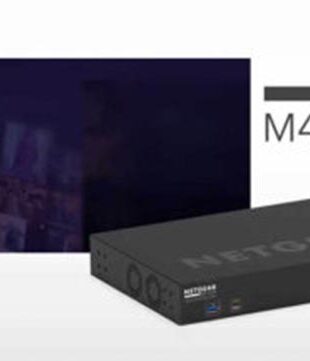
We designed the NETGEAR M4250 and M4350 series switches specifically for AV and broadcast applications. They boast capabilities and features such as adjustable fans, front- or rear-facing ports, depending on your installation needs, and redundant power supplies on some models. These may sound like small details, but in practice, they can take a lot of friction out of planning and setup.
Another useful tool we’ve developed to simplify the implementation of IP networks for media is the NETGEAR AV OS™. This AV-oriented OS is built into every switch and available for multiple device configuration in the free NETGEAR Engage™ Controller. It makes it easier to configure one or many switches using our certified profiles, without needing to dive into command lines or generic IT menus.
Instead of typing in VLAN configurations, for example, an engineer can just assign a profile to a port or group of ports across multiple switches — Dante, NDI, ST 2110 — and move on. This straightforward software-based configuration and control tool simplifies day-to-day management, reducing both the time and energy required. This also means configuration is consistent across the installation, eliminating missteps in setup.
Thoughtful Additions That Make a Difference
Some of the newer hardware features of our broadcast-friendly managed switches have come directly from user feedback. For instance, select NETGEAR M4350 switches now incorporate colored LEDs that match profile assignments, in turn making it easier to make and trace connections quickly, especially during live production. We’ve also added secure power connectors and support for timing protocols like PTP and boundary clock mode, which are essential in broadcast environments working with ST 2110.
Individually, these features might not be considered a major benefit to broadcasters. But for engineers still becoming familiar with the intricacies of IP-based media workflows — or just interested in spending their time on other aspects of their work — they add up and make a substantive difference in getting infrastructure set up right and doing so quickly.
Support at Every Step
Another way in which we’re making IP easier for broadcasters is by providing network design support from the start, and by offering ongoing support through deployment and ongoing maintenance or growth. The NETGEAR network design services team works directly with integrators and engineers before a purchase to help spec the right switches, validate system designs, and make sure everything works together. And if something does go wrong once systems are set up, our support team has the deep expertise and experience in IP-based networking for media to understand the issue and aid in successful resolution.
This level of support is particularly important given that broadcast infrastructure is necessarily different for every organization and use case. There is no one-size-fits-all solution, but we’ve built tools into our products that allow broadcasters to deploy infrastructure that delivers the benefits of IP networks across an array of applications, minus the headaches.
Helping to ensure that systems across the IP network just work, NETGEAR switches, software, and support free up broadcast operations to focus less on infrastructure and more on getting high-quality content to viewers with speed and efficiency.
Ready to simplify your broadcast IP network?
Whether you’re planning a full ST 2110 deployment or integrating IP into a hybrid setup, we’re here to help. Reach out to our Broadcast Design Services team to start a conversation about how we can support you and your network, from design to deployment and beyond.