Why Use a Portable Hotspot Instead of Tethering?
Phone tethering, AKA “WiFi Sharing” or “Personal hotspot” is the ability for phones with the appropriate cell plan to share their Internet connection through WiFi to other devices. Phone tethering is generally used for essential devices such as iPads, android tablets and laptops lacking 5G radios, or when the public WiFi is unreliable, or potentially unsafe. Phone tethering technology can work in a pinch, but if you find yourself relying on it often, you might consider the alternative – a dedicated 5G Mobile Hotspot or Mobile Router.
5G Mobile Hotspots are the superior choice to tethering for speed, security and reliability, and even compared to earlier mobile hotspot devices. The latest NETGEAR Nighthawk mobile routers can connect with up to 64 devices in a secure and private network at multi-gigabit speeds. NETGEAR portable hotspots are technically advanced and cost-effective for anyone who needs internet access while on the move for travel, business, or remote living.
Portable 5G router Advantages
There are a lot of technical and practical advantages that come with owning a NETGEAR portable WiFi hotspot router.
Nighthawk Hotspots benefits:
- Compact, battery-powered mobile routers for 24/7 internet connection
- Powerful battery endurance compared to sharing with a phone
- SIM-enabled for 4G/5G connectivity in 125 countries worldwide on select models
- eSIM feature soon available on select models (Discover Nighthawk 5G M7)
- Ideal for use in vehicles, hotels, airports, and remote sites
- Optional Add-on Omnidirectional Antenna with up to 2.5dB gain to squeeze ever last drop cellular range
Phone Tethering Disadvantages
You might be asking – “Why not just use Phone Tethering?”. WiFi networks in 2025 are getting bigger and more complex. The latest 5G portable hotspots can access blazing-fast WiFi6, WiFi 6E and WiFi 7, while phone tethering can only support a few devices at short range and might struggle to keep up with the needs of modern WiFi devices.
Disadvantages of cell phone tethering include:
- Battery drain and overheating on phones
- Limitations on connections and data throttling
- Possible interruption during calls or texts
- Costly international roaming charges
Top Features of the NETGEAR M3, M6, M7 Pro
Nighthawk M3, M6 and M7 Pro portable routers are ideal for high-speed internet on the go. They are so powerful they can even be used as the primary home, apartment or hotel WiFi network router, perfect for people who relocate often (select models). Today’s deals from internet service providers include affordable unlimited data usage plans for mobile WiFi hotspots, the superior alternative to public WiFi, or even your wired ISP.
Nighthawk mobile routers deliver high-performance 5G internet with blazing-fast WiFi technology on the go or at your office or even at home. Our mobile routers are unlocked and certified to work with the providers in +more 125 countries. Swap SIM cards and data plans in seconds.
Keep your sensitive data more secure by avoiding public WiFi networks. With Nighthawk mobile hotspots, enjoy safer WiFi anywhere and better protect your business or family.
|
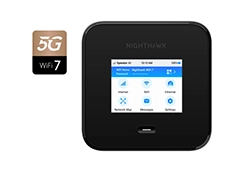
Nighthawk M7 Pro
 |
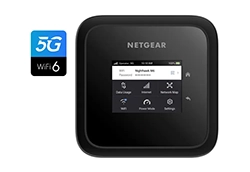
Nighthawk M6
 |
Nighthawk M3
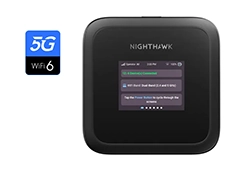 |
| 5G speed (up to) |
6 Gbps |
2.5 Gbps |
2.5 Gbps |
| WiFi technology & speed (up to) |
WiFi 7, up to 5.8 Gbps |
WiFi 6, up to 3.6 Gbps |
WiFi 6, up to 3.6 Gbps |
| Wired port(s) |
1 x Ethernet (2.5 Gbps)
1 x USB-C (10 Gbps) |
1 x Ethernet (1 Gbps)
1 x USB-C (5 Gbps) |
1 x USB-C (5 Gbps) |
| Devices supported |
64 devices |
32 devices |
32 devices |
| Battery life (up to) |
10 hours |
10 hours |
10 hours |
| Coverage (up to) |
1,000 sq. ft |
1,000 sq. ft |
1,000 sq. ft |
| Global SIM support |
125+ countries |
125+ countries |
125+ countries |
| Use cases |
Ideal for high-traffic environments or mobile businesses
Can serve as backup for small offices or smart homes
|
Good balance of 5G/WiFi speeds for work and international travel
Can serve as back up for smart homes |
Perfect for work, streaming and for travelling
|
| Learn more |
Nighthawk M7 Pro
(MR7450) |
Nighthawk M6
(MR6150) |
Nighthawk M3
(MH3150) |
Extend Your Coverage with External Antennas
Cell tower coverage continues to grow at a rapid rate worldwide, but occasionally you might be in a place with less than ideal reception, even for a hotspot. In this case an unlocked 5G WiFi hotspot with a removable external antenna can dramatically improve WiFi reception and increase wireless coverage. NETGEAR Omnidirectional MIMO antenna is particularly useful in remote and rural areas where cell tower reception is weak. Omnidirectional MIMO Antennas also improve internet connections in buildings and built-up areas. Simply connect the antenna to your 5G/4G/3G mobile hotspot.
5G Portable WiFi Router Use Cases:
- Stay connected anywhere: 5G portable WiFi routers are perfect for remote workers and freelancers who need reliable internet on the go
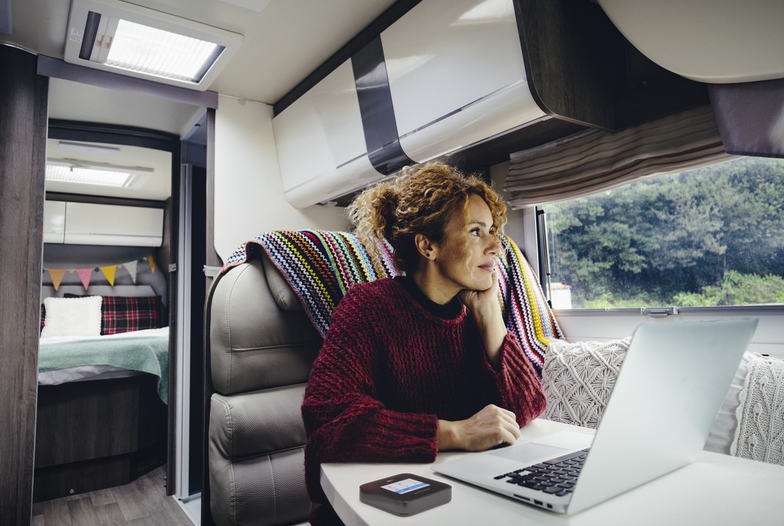
- Ideal for life on the road: Perfect for people living in RVs or vans who require a stable, high-speed connection while traveling
- Travel-friendly performance: Travel routers offer long battery life and can share internet connectivity with multiple devices through blazing-fast WiFi 6, 6E, or 7
- Emergency internet backup: Ensure strong, always-on connectivity for small businesses or smart homes that rely on 24/7 internet access (e.g., video surveillance, storage, etc.)
- Home internet alternative: A great solution for areas with limited or no fixed-line connectivity where DSL or fiber is unavailable
- Enhanced security while abroad: Enjoy safer, private internet access during international travel
- Optional power bank support: keeps your phone available thanks to the integrated power bank functionality
Why NETGEAR Nighthawk Hotspots Lead the Way
NETGEAR Nighthawk Hotspots offer the speed, security, and convenience needed for modern living. NETGEAR has been a wireless technology pioneer since the 1990s, when WiFi was first introduced to consumers on a commercial scale. The NETGEAR reputation remains strong, including market-leading mobile WiFi technology. The NETGEAR Nighthawk M7 Pro, Nighthawk M6 and Nighthawk M3 are the latest in the evolution of seamless mobile WiFi hotspots for high-demand applications and environments.
Nighthawk 5G portable routers also offer some unique features such as WiFi Offloading: Automatically switches from cellular data to available WiFi networks (such as hotel or public WiFi) to reduce data usage and improve performance, while protecting your data.
FAQ
What’s the difference between M6 and M7 Pro?
The M6 offers excellent 5G WiFi Hotspot performance and WiFi 6, while the M7 Pro 5G router supports faster 5G speeds (up to 6Gbps), and WiFi 7. M7 Pro is best for high-demand environments.
Can I use these hotspots internationally?
Yes, especially the M7 Pro, which supports roaming in over 125 countries. Make sure to check for a compatible SIM card and data plan.
How many devices can connect to these hotspots?
Both M7 Pro supports up to 64 devices simultaneously – ideal for families, small teams, or tech-heavy households. The M6 and M3 both support up to 32 devices.
Is a portable WiFi router better than using my phone as a hotspot?
Yes. Portable routers like the M7 Pro deliver stronger signals, higher data throughput, longer battery life, and do not interrupt your phone’s other functions.
Do I need a specific carrier?
No. These devices are unlocked and compatible with major carriers like O2. Simply insert a SIM and you’re ready. Check with your provider for further details.
Can I use the M7 Pro or M6 as my home internet?
Absolutely. Many users use these as a primary connection (M7 Pro is a good fit) or as a backup (M6) when fixed broadband fails. Especially handy in this case is the plugged-in In-Home Performance mode.