

IN THIS ARTICLE
Introduction to WiFi 7 for Business
WiFi 7, also known as 802.11be, is the latest advancement in wireless technology, offering significant improvements over its predecessors. It operates on three bands: 2.4 GHz, 5 GHz, and the new 6 GHz, providing faster speeds, lower latency, and improved efficiency. The introduction of WiFi 7 marks a transformative shift, enabling higher data rates and enhanced connectivity for a multitude of devices.
Common Mistakes in WiFi Implementation
Inconsistent WiFi coverage remains a widespread issue, especially in buildings not originally designed for dense networking. Many offices and schools still deal with dead zones, particularly in stairwells, corners, older classrooms, and meeting rooms. Extending coverage with mesh or additional APs is o
1. Lack of Planning
• Many organizations dive into WiFi implementation without proper planning, leading to suboptimal performance.
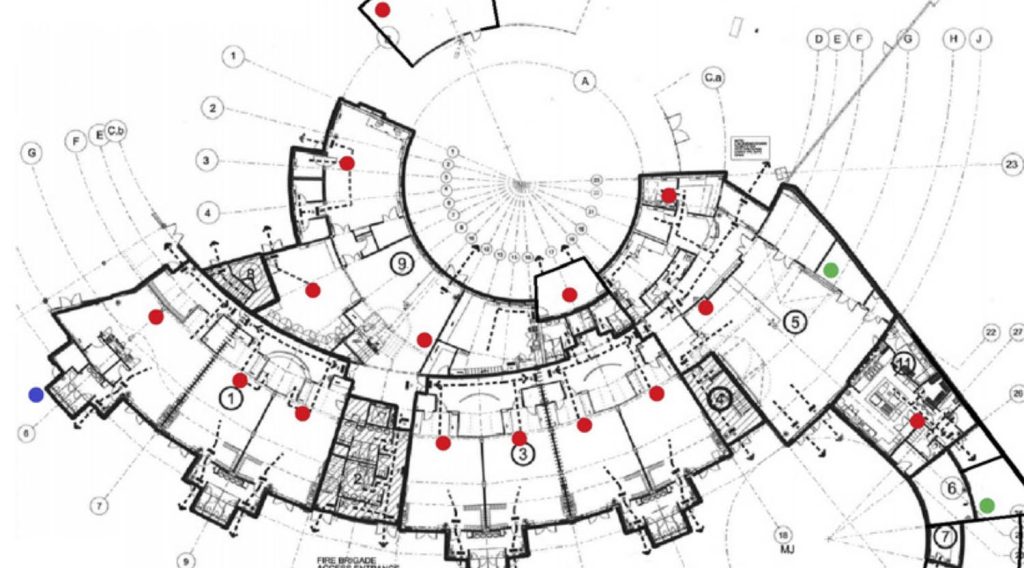
• Solution: Conduct a thorough site survey using heat mapping tools to predict with high accuracy where to place access points for optimal coverage.
• Consider construction materials, interference sources, and user density in the planning phase.
• Utilize professional assistance if needed; services like NETGEAR’s Pro WiFi Design can provide expert guidance.
2. Underestimating Power Requirements
• Access points (APs) vary in their power needs, and underestimating these can lead to performance issues.
• Solution: Consult with a representative or engineer to understand the specific power needs of your chosen APs.
• Utilize PoE (Power over Ethernet) switches to ensure that APs receive adequate power.
• Plan your PoE budget carefully to avoid outages and ensure consistent performance.
3. Neglecting Wired Infrastructure
• Relying solely on wireless connections without a robust wired backbone can cripple your network.
• Solution: Upgrade your Ethernet infrastructure alongside your wireless deployment.
• Use high-quality cabling (Cat 6, Cat 6a, or Cat 7) to support higher data transmission rates.
• Ensure that switches and routers are also upgraded to handle increased traffic and speeds.
4. Misunderstanding WiFi Bands
• The new 6 GHz band offers faster speeds but shorter ranges compared to the 2.4 GHz and 5 GHz bands.
• Solution: Use the 6 GHz band for high-speed, short-range applications and the 2.4 GHz band for long-range, lower-speed needs.
• The 5 GHz band serves as a middle ground, offering a balance of speed and range.
• Educate users on the appropriate use cases for each band to optimize overall network performance.
5. Improper Channel Management
• Advanced features like channel bonding can be misunderstood, leading to inefficient use of the spectrum.
• Solution: Leverage channel bonding to combine channels for higher throughput, similar to port aggregation in switches.
• Ensure your management software or tool can handle these configurations automatically.
• Use Preamble puncturing to navigate around interference, ensuring smooth and efficient data transmission.
6. Inefficient Use of Wide Channels
• WiFi 7 supports ultra-wide channels up to 320 MHz, but improper use can cause interference.
• Solution: Understand the main advantage of wide channels: reduced interference and higher data rates.
• Avoid congested channels by using tools that can automatically adjust channel widths and placements.
• Consider the environment and use narrower channels if interference is a concern.
7. Poor Network Management
• Even with the best hardware, poor management can lead to network failures.
• Solution: Implement a centralized management system like NETGEAR Insight to automate channelization and other configurations.
• Regularly monitor network performance and make adjustments as needed.
• Provide training for IT staff to ensure they are equipped to manage and troubleshoot the network effectively.
ften a patchwork solution rather than a holistic redesign.
Software Tools and Resources for Network Management
Use cloud-based management tools for real-time network insights and control. Make sure the software supports WiFi 7 features like channel bonding and preamble puncturing. Keep your software updated to take advantage of new features and security improvements.
Conclusion
n summary, WiFi 7 offers incredible advancements, but with great power comes great responsibility. Avoiding common mistakes such as lack of planning, underestimating power needs, and neglecting wired infrastructure can ensure a seamless and efficient network. By understanding the characteristics of different WiFi bands, leveraging advanced features, and employing effective channel management, you can optimize your WiFi 7 deployment. Finally, utilizing robust software tools for network management will keep your network running smoothly and efficiently.
By taking these proactive steps, you can transform your WiFi implementation from a potential headache into a streamlined, high-speed success. Ready to get started? Let’s make your wireless network as powerful and efficient as it can be!
Contact Our Team:
Reach out to our Pro WiFi team to get started: In summary, Wi-Fi 7 offers incredible advancements, but with great power comes great responsibility. Avoiding common mistakes such as lack of planning, underestimating power needs, and neglecting wired infrastructure can ensure a seamless and efficient network.
By understanding the characteristics of different Wi-Fi bands, leveraging advanced features, and employing effective channel management, you can optimize your Wi-Fi 7 deployment. Finally, utilizing robust software tools for network management will keep your network running smoothly and efficiently. By taking these proactive steps, you can transform your Wi-Fi implementation from a potential headache into a streamlined, high-speed success. Ready to get started?
Let’s make your wireless network as powerful and efficient as it can be!
Reach out to our Pro WiFi team to get started: netgear.com/prowifidesign or email: ProWiFiDesign@netgear.com.
Click for Pro WiFI Design Support
Download the WiFi 7 Deployments Mistakes Report Here
Watch the Full Webinar and Recap Here
More information
More information about our Business products.
Learn everything about IP-networking on our NETGEAR ACADEMY.
Our engineers will help you on your project for free.