Keep Modules Cool
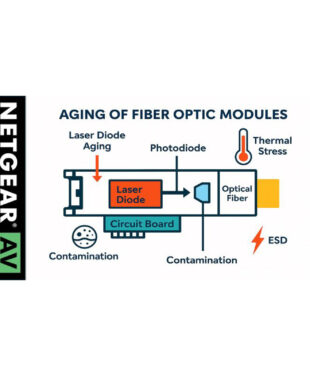
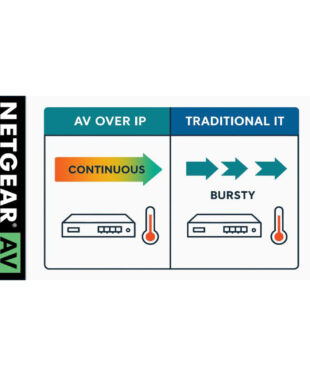
Heat is the biggest enemy of electronics. Make sure to:
- Provide good ventilation in racks and switches
- Use blanking panels on unused SFP ports to maintain airflow
- Opt for industrial-grade modules in high-temperature environments (up to 85°C)
- Add extra cooling, such as fans or air conditioning, in consistently hot conditions
- Use DDM/DOM to monitor module temperature. Many switches issue overheating warnings—take them seriously.
Use the Right Module for the Right Distance
Overload isn’t just about data speed; optical power matters too:
- Use long-range modules (e.g., 40 km) only for long distances
- Avoid overdriving the receiver on short links
- Choose modules with some margin if you’re close to spec limits
A module that works “harder” than necessary wears out faster.
Keep Fiber Connections Clean
Dust and dirt on connectors can:
- Attenuate light
- Cause reflections
- Put extra strain on the laser
- Lead to microscopic damage
Use proper fiber cleaning tools like lint-free swabs with isopropanol. Always place dust caps on unused ports and cables.
Limit Unnecessary Plugging and Unplugging
Although SFP modules are hot-swappable, they have a limited mechanical lifespan:
- Avoid frequent module swaps
- Use patch panels or short patch cables to reduce stress on modules
- Remove modules only when absolutely necessary
Each cycle causes tiny wear on contact points.
Monitor Module Health via DDM/DOM
Modern transceivers offer Digital Diagnostic Monitoring, allowing real-time readings of:
- Temperature
- Transmit power
- Receive power
- Supply voltage
- Bias current
Set alerts for abnormal values. This lets you act early—before the module fails.
Log and Analyze Errors
Keep an eye on your switch logs:
- Watch for messages like “DOM RX power low” or “High error rate on interface”
- Swap modules between ports to see if the issue follows
This helps you quickly determine if a module needs replacement.
Use Quality Modules for Critical Links
For backbone links and other vital connections:
- Choose NETGEAR-quality or well-tested third-party modules
- Avoid budget modules with less reliable lasers
- Check compatibility and monitoring feature availability
Cheap can turn expensive, especially in AV environments.
Plan Lifecycle and Replace on Time
Don’t wait for a module to fail:
- Define a replacement strategy (e.g., after 5 years or x operating hours)
- Keep a stock of identical spare modules
- Document installation dates and locations per module
- Consider rotating modules between critical and less critical positions
This prevents surprises during live broadcasts or events.
Consider Industrial or Ruggedized Modules
In challenging AV environments (heat, dust, outdoor locations):
- Use modules with extended temperature ranges
- Choose ruggedized variants for continuous operation
- Note: industrial modules aren’t immune to heat—cooling remains essential
These modules offer extra reliability where needed.
Conclusion
With proper maintenance and monitoring, you can greatly reduce the impact of wear. Fiber modules don’t fail suddenly, they degrade gradually. By recognizing and managing this in time, you can prevent outages and ensure the reliability of your AV over IP network.
In the next blog, we’ll dive into replacement strategies and lifecycle management.